
The LinkedIn Networking & Messaging Playbook (Connections, InMail & AI Outreach): The Definitive Guide
Table of Contents
In 2026, applying to jobs online feels broken. Qualified candidates submit hundreds of applications and hear nothing back—while roles quietly get filled through referrals, internal recommendations, and direct outreach on LinkedIn.
This guide shows you how to use LinkedIn the way top candidates actually do: to build visibility, start real conversations, and access opportunities that never make it to job boards. You’ll learn when to connect, when to follow, how to message without sounding transactional, and how to use AI responsibly—so your outreach feels human, not automated.
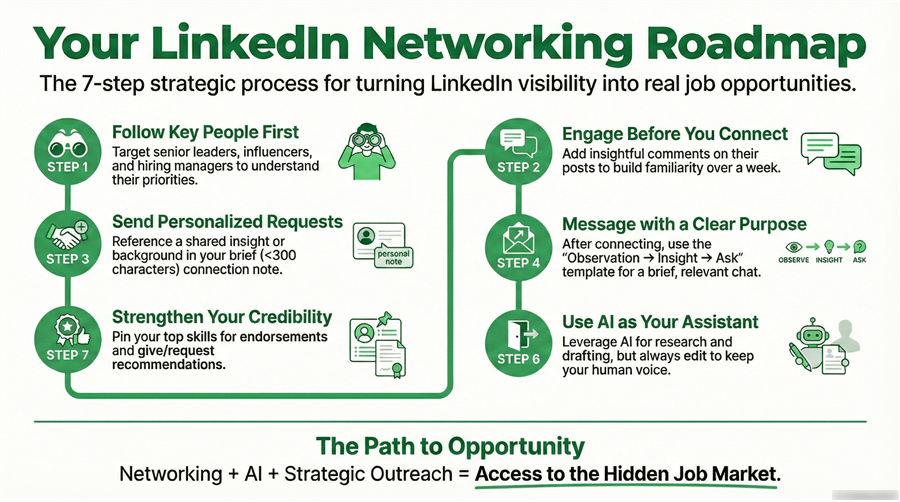
LinkedIn Follow vs. Connect: The Strategic Difference in 2026
One of the most misunderstood mechanics on LinkedIn is the difference between following and connecting. In 2026, these are no longer interchangeable actions—they are two distinct signals of intent, each interpreted differently by both the algorithm and the person on the receiving end.
Treating them strategically is the difference between building quiet influence and triggering instant resistance.
When You Should Follow
Following is best used for high-status or high-distance targets—industry thought leaders, senior executives, founders, and “Big Voice” creators at companies you admire.
From an algorithmic perspective, following:
- Tunes your feed toward their content
- Signals interest without demanding reciprocity
- Allows repeated soft exposure through likes and comments
From a psychological perspective, following is non-invasive. It lets you “enter the room” without knocking on the door. In an AI-saturated environment where senior leaders receive dozens of templated messages per week, not asking for access is often the fastest way to earn it.
Best use cases for following first:
- C-suite executives and VPs
- Hiring managers before you apply
- Influencers you want to reference later in outreach
Pro Insight: In 2026, thoughtful public comments are often more visible—and more trusted—than private messages. A well-placed insight on a public post can warm a future connection request more effectively than any cold DM.
When You Should Connect
A connection request, by contrast, is a request for mutual access. Once accepted, you unlock free messaging, profile visibility, and algorithmic proximity. Connecting works best for:
- Peers in similar roles or industries
- Recruiters and talent partners
- Alumni and second-degree mutuals
- Directly hiring managers after a trigger event
However, in 2026, over-connecting is a real risk. Sending premature connection requests—especially without context—can quietly lower response rates over time. Many professionals now treat connection requests the same way they treat cold sales emails: filtered, skimmed, or ignored. This is why context matters more than courtesy.
The 2026 Playbook: Follow → Engage → Connect
The most effective approach is not choosing between follow and connect, but sequencing them. The proven sequence:
- Follow first to understand their priorities and language
- Engage meaningfully with 2–3 posts over a week (no emojis, no fluff)
- Connect with context, referencing a specific insight they shared
This transforms your request from “Who is this?” into “Oh, I’ve seen this person around.” In an era where attention is scarce and trust is fragile, familiarity beats urgency every time.
Strategic Connection & Outreach— How to Get Accepted (and Remembered)
Most LinkedIn users believe connection success comes down to wording. In reality, acceptance rates in 2026 are driven far more by context, timing, and perceived relevance than by polite phrasing.
A perfectly written message sent at the wrong moment—or to the wrong person—will still fail.At a psychological level, people accept connections for only three reasons:
- Familiarity – “I’ve seen this person before.”
- Similarity – “This person feels like my past self or me.”
- Utility – “This person might be useful to know.”
Everything else—flattery, enthusiasm, formality—is noise. This explains why:
- Alumni outreach consistently outperforms cold outreach
- Peer-to-peer requests convert better than aspirational ones
- Commenting publicly before connecting dramatically increases acceptance
In 2026, when AI-generated messages are abundant, recognition beats personalization. People trust what feels familiar more than what feels clever.
How to Connect with People on LinkedIn (The “Value-First” Model)
The era of the “blank” connection request is over. Data shows that personalized requests have a 74% higher acceptance rate. However, personalization in 2026 isn’t just about mentioning their name; it’s about establishing immediate relevance.
As a Reddit user from r/Career: “Networking gets you opportunities… I focus on being genuinely helpful… instead of ‘networking’ in a forced way”.
To follow this “human-centric” approach, your connection strategy should focus on Authentic Growth. Instead of asking for a job, offer a perspective or ask a high-level industry question.
How to Connect With Peers (Your Highest-ROI Segment)
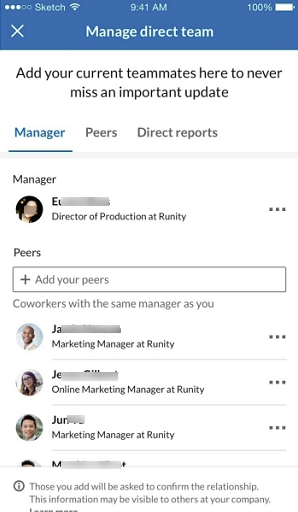
Peers—professionals at a similar career stage—are often overlooked but deliver the highest long-term value. They’re more likely to accept requests, change companies frequently, and evolve into referrals or hiring decision-makers over time. A strong peer network compounds quietly as your career grows.
Effective peer outreach focuses on shared context, not credentials. Reference common ground—similar roles, tools, challenges, or industry trends—to signal collaboration rather than need. Thoughtful observations or questions position you as a peer, not a job seeker.
Connecting With Recruiters: Respect the Workflow
Recruiters are workflow-driven and measured on speed and relevance—not relationship-building. Effective outreach starts with precision: contact the recruiter who owns the role and reference a clear trigger like a job posting or team expansion.
If you’ve applied, say so briefly and explain the fit. Avoid attachments, long explanations, or early meeting requests. Clarity beats enthusiasm, and silence usually reflects prioritization—not rejection.
How to Connect With Hiring Managers (Without Burning the Bridge)
Hiring manager outreach is high-impact but high-risk. Cold pitching, asking for time too early, or ignoring their priorities often backfires.
A better approach is gradual: engage with their content, watch for clear triggers (new roles, team growth), and lead with shared challenges or professional curiosity. The goal is a peer-level exchange—not an immediate job ask.
How to Write LinkedIn Messages That Actually Get Replies
Once your targeting is right, messaging becomes the deciding factor. This section breaks down proven LinkedIn message structures—from connection requests to follow-ups—that consistently earn replies.
Crafting Connection Messages on LinkedIn
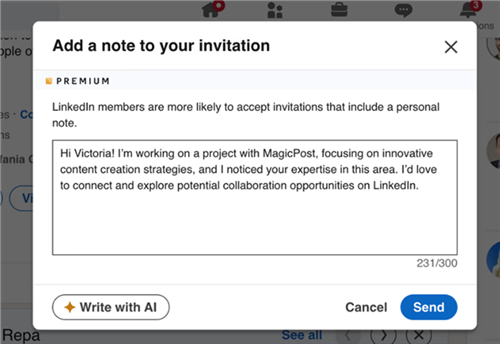
Your connection message should be a maximum of 300 characters. In 2026, brevity is synonymous with professionalism.
The “Observation-Insight-Ask” Template:
“Hi [Name], I’ve been following your work on the [Project Name] and loved your recent point about [Specific Detail]. I’m a [Your Role] focusing on similar challenges and would love to connect to stay updated on your insights. Best, [Your Name].”
Mastering LinkedIn Introduction Messages
An introduction message occurs after the connection is accepted. This is where you move from “connection” to “conversation.” Avoid the “I’d love to pick your brain” trap—it’s too vague and asks for too much time.
Instead, use a “Micro-Ask”:
“Thanks for connecting, [Name]! I saw that [Company] is expanding into [Market]. As someone who worked on [Similar Project], I was curious—are you seeing [Specific Trend] as a major hurdle right now? No need for a long reply, just curious about your take!”
How to Reach Out to Alumni on LinkedIn
Alumni are your highest-converting outreach targets. The “shared struggle” of your alma mater creates an instant sense of psychological safety.
The Script: “Hi [Name], fellow [University Name] alum here! I see you’ve made a fantastic transition into [Industry]. As a current [Your Role] looking to make a similar move, I’d love to connect and hear if there was one specific skill you found most helpful during your first year at [Company].”
InMail vs. Message – When to Pay?
Understanding the difference between an InMail and a standard message is critical for managing your LinkedIn Premium or Sales Navigator budget.
| Feature | Standard Message | LinkedIn InMail |
| Prerequisite | Must be connected (1st degree). | Can be sent to anyone (2nd or 3rd degree). |
| Cost | Free & Unlimited. | Limited monthly credits. |
| Visibility | Standard Inbox. | “InMail” tag; often stays at the top of the inbox. |
| Refund Policy | N/A | Credits are refunded if the recipient replies within 90 days. |
Save your InMail credits for “High-Value Targets” (Hiring Managers at your top 3 target companies). Use standard messaging for everyone else by focusing on building 1st-degree connections first.
How to Use LinkedIn Endorsements and Recommendations as Social Proof
In an AI-saturated market, Social Proof is the only thing that cannot be easily faked. This is where your profile gains its “trust score.”
LinkedIn Endorsements
Endorsements are the “quick-fire” social proof. To optimize these:
- Pin your top 3 skills: Ensure they align perfectly with your target job description.
- The Reciprocity Loop: Endorse 5 colleagues for their strongest skills today. Usually, 2 or 3 will return the favor within 48 hours.
Asking for Recommendations on LinkedIn
A recommendation is a long-form testimonial. It is significantly more powerful than an endorsement.
How to ask:
- Choose the right person: Someone who has seen your work firsthand (Manager, Peer, or Direct Report).
- Provide a draft: People are busy. Reduce the “friction” of writing.
- The “Directed” Ask: “Hi [Name], would you be open to writing a brief recommendation for me regarding our work on [Project]? I’m particularly looking to highlight my [Specific Skill]. To make it easier, I’ve included a few bullet points of what we achieved below.”
How to Write a LinkedIn Recommendation for Others
Writing recommendations for others is a “hidden” SEO hack. Your name and photo appear on their profile, creating backlinks and visibility to their network.
The “Recommendation Formula”: [The Hook: How you know them] + [The Achievement: What they did] + [The Character: Who they are] + [The Verdict: Why you recommend them].
Using AI to Personalize and Scale LinkedIn Outreach
Now, we advocate for the “Cyborg Approach”—using AI for job research and drafting, but using human judgment for the final touch.
How to Use AI for Outreach Without Looking Like a Bot
In 2026, recruiters can spot “Standard GPT” outreach from a mile away. To avoid the spam filter:
- Feed the AI “Trigger Events”: Instead of saying “Write a LinkedIn message,” say “Write a message to [Name] at [Company] who just announced a [New Partnership]. Mention that I am a [Role] and want to know how this affects their [Department] strategy.”
- The 20% Rule: Always edit at least 20% of an AI-generated message. Change the “opening hook” or the “closing sign-off” to match your natural speaking voice.
- Search Intent Alignment: Use AI to analyze a recruiter’s recent posts and identify the “keywords of interest” they are currently using, then weave those into your introduction.
Jobright.ai Review: AI-Powered Job Search & Resume Matching Platform
Applying a human-first AI outreach strategy requires more than prompt engineering—it requires the right infrastructure. From job discovery and resume alignment to referral identification and personalized outreach, platforms like Jobright.ai are designed to operationalize this approach across the entire job search funnel.
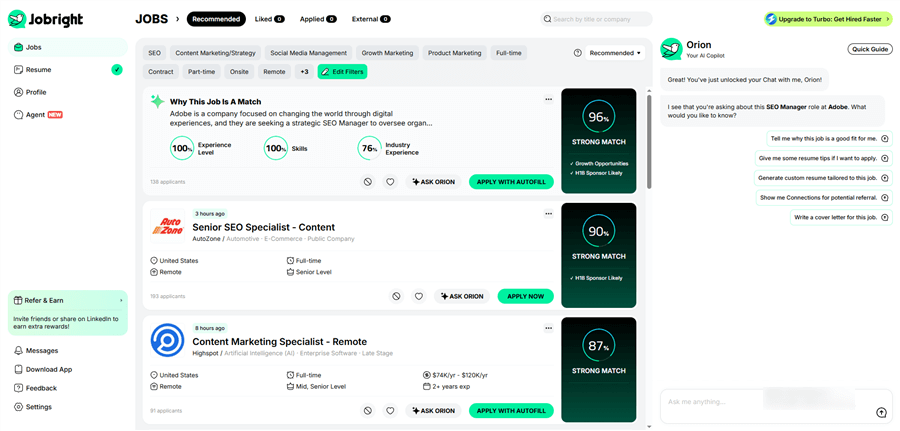
Jobright.ai is an AI-driven career platform designed to help job seekers find better-fit roles faster. Instead of manually searching through job boards, Jobright uses AI to match candidates with relevant opportunities, optimize resumes for specific roles, and support outreach and applications—all in one workflow.
Unlike traditional job platforms that focus on listings, Jobright.ai focuses on fit, efficiency, and execution across the entire job search process.
Key Features:
- AI Job Matching: Jobright analyzes your resume, skills, and career goals to recommend roles that closely align with your background, reducing time spent on low-quality applications.
- AI-Optimized Resumes: The platform can tailor your resume to specific job postings, helping it better align with ATS requirements and recruiter expectations.
- Referral & Connection Insights: Jobright highlights potential internal connections at target companies—such as alumni or team members—and helps you approach outreach more strategically.
- AI Career Copilot: A built-in AI assistant provides on-demand guidance for job search strategy, resume decisions, and next steps throughout the process.
- Application Autofill: Jobright supports automated form filling for job applications, reducing repetitive manual work and speeding up submissions.
- Aggregated Job Listings: The platform pulls roles from multiple sources, giving users access to a broader and more centralized job pool.
How It Works (Simple Flow)
Step 1. Sign up and upload your resume: Jobright uses this to understand your experience and career direction.
Step 2. Receive AI-matched job recommendations: Roles are prioritized based on relevance, not just keywords.
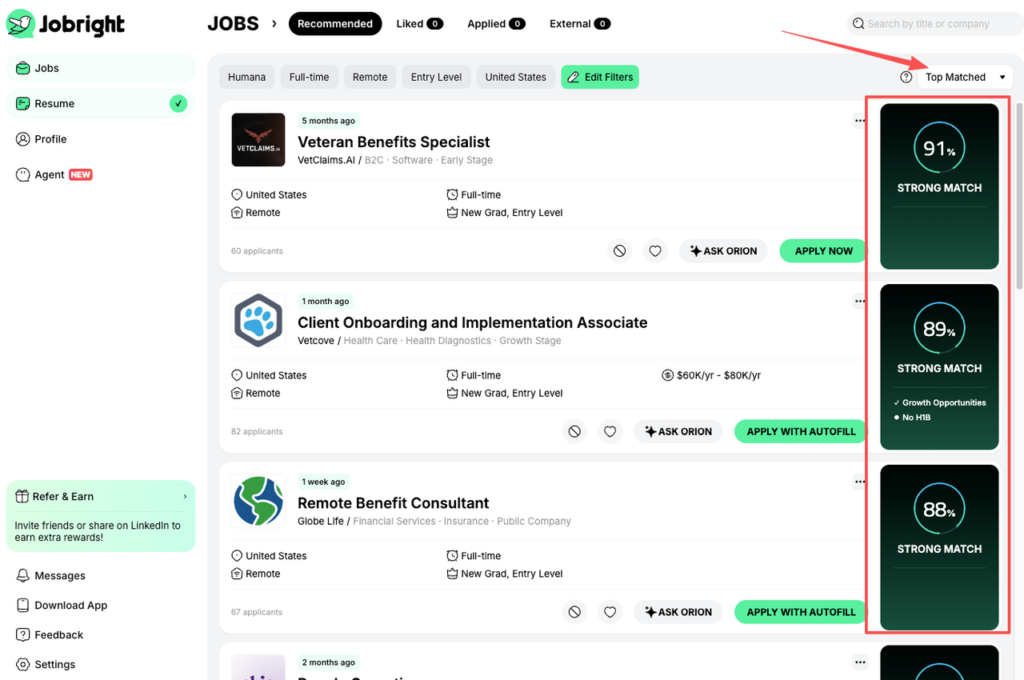
Step 3. Customize your resume per role: Use AI suggestions to improve alignment with each position.
Step 4. Identify potential referrals: Discover who inside a company you might realistically connect with.
Step 5. Apply faster with autofill tools: Reduce friction in the application process.
Step 6. Get ongoing AI guidance: Use the Career Copilot for advice as your search evolves.
Conclusion:
Winning on LinkedIn in 2026 requires shifting from visibility to relevance. The most effective professionals treat networking as relationship-building, not broadcasting—using context, intent, and consistency to position themselves as credible peers rather than active job seekers.
Start by aligning your top skills with target roles, reconnecting with alumni through shared context, and giving value first by writing a thoughtful recommendation. When paired with AI-powered tools like Jobright.ai to streamline matching, outreach, and execution, these actions compound into a career ecosystem that creates opportunities—even when you’re not actively applying.
Frequently Asked Questions
What is the best LinkedIn outreach strategy in 2026?
The most effective LinkedIn outreach strategy in 2026 focuses on relevance over volume. High-performing messages are short, personalized, and triggered by real signals—such as job postings, team expansion, or recent content—rather than generic introductions.
How long should a LinkedIn connection message be?
A LinkedIn connection request should stay under 300 characters. Short messages signal professionalism and respect attention, while still leaving room to reference shared context or a specific observation.
Why do most LinkedIn messages not get replies?
Most LinkedIn messages fail because they ask too much too early. Common mistakes include vague requests (“pick your brain”), immediate job pitches, or messages that show no awareness of the recipient’s role or priorities.
Is it okay to use AI for LinkedIn outreach?
Yes—but only when used correctly. AI should support research, drafting, and signal detection, while humans handle judgment, tone, and final edits. Fully automated or unedited AI messages are easy for recruiters to spot and often ignored.
How do recruiters recognize AI-generated LinkedIn messages?
Recruiters can identify AI outreach by generic phrasing, unnatural enthusiasm, lack of specificity, and repeated message patterns. Messages that don’t reference recent activity or role-specific context are usually flagged as low-effort.