
LockedIn AI Pricing (2026): Plans, Credits vs Unlimited, and the Cheapest Way to Use It
Table of Contents
Pricing pages can be deceptively simple. Sure, a “per credit” cost looks low, but what happens when you need to redo a coding mock three times to get it right? I decided to stop guessing and start calculating. I took the current LockedIn AI pricing structure and stress-tested it against three real-world interview scenarios: the light prep, the solid prep, and the intense multi-round loop.
In this post, I’m cutting through the noise. I’ll show you exactly what “credits” translate to in actual practice hours (it’s less than you think) and compare LockedIn AI plans to help you find the sweet spot. If you want to know the cheapest way to use it without sacrificing your performance quality, you’re in the right place. Let’s dive into the numbers.
Plans at a glance (Credits vs Unlimited)
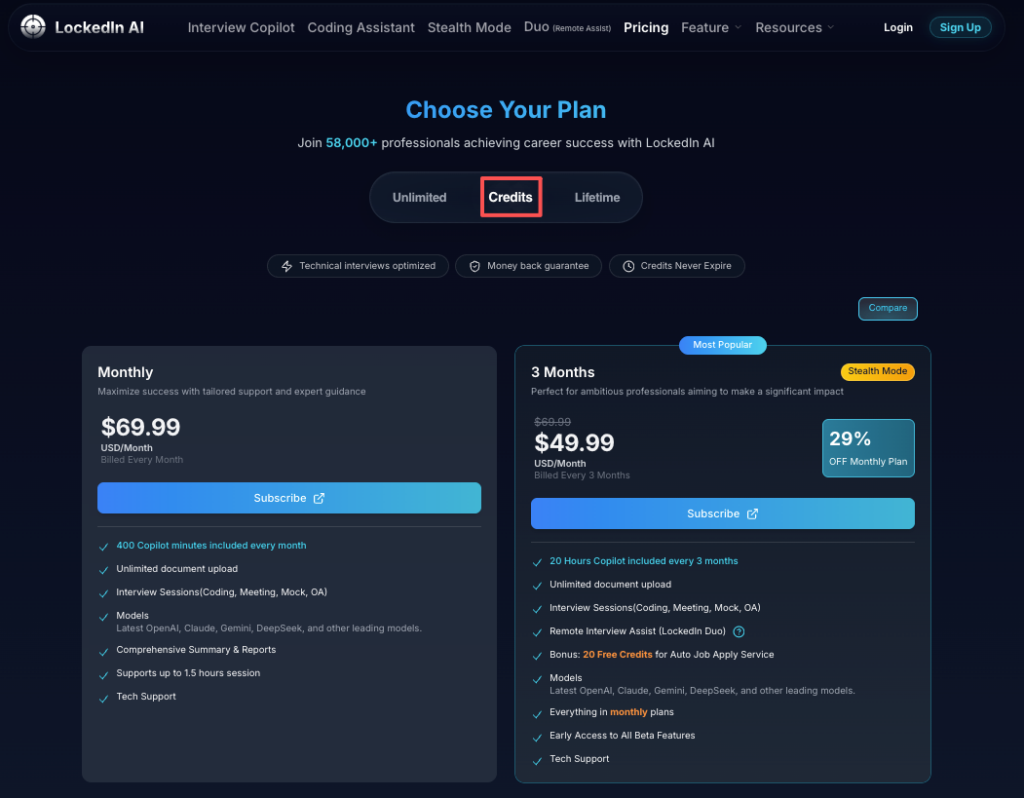
LockedIn AI plans generally come in two buckets:
1. Credits-based plans
- You pay for a pool of credits.
- Each “AI action” (mock interview sessions, answer generation, feedback, or related features) consumes credits.
- Best if you’re interviewing lightly or you want to test the workflow without committing.
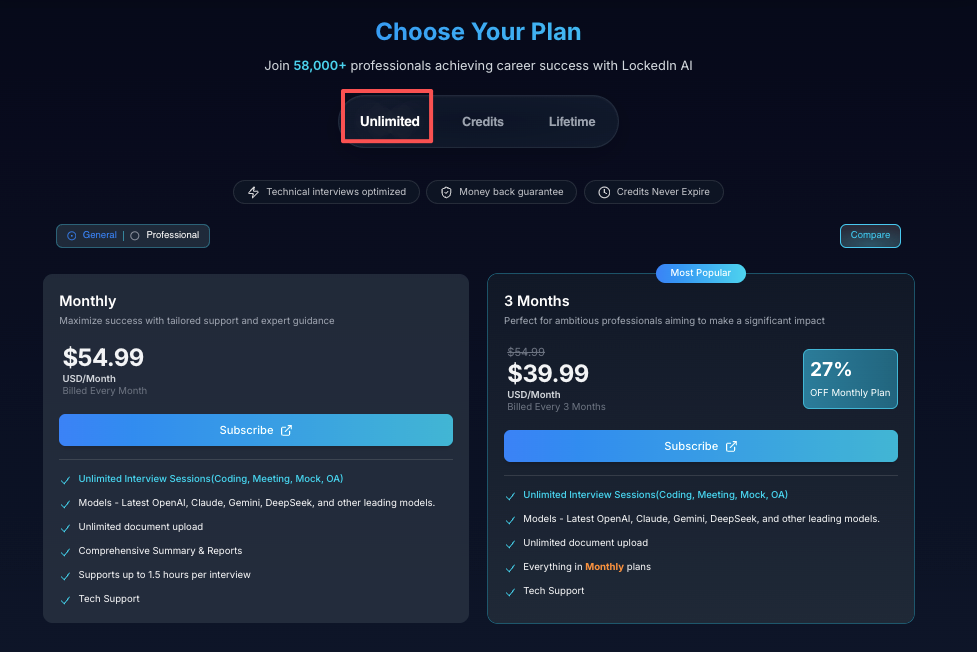
2. Unlimited plans
- You pay a flat rate for a time window.
- You can run more sessions without watching a credit counter.
- Best if you’re in a multi-round loop (screen → technical → behavioral → hiring manager → onsite) and you’ll practice almost daily.
Here’s the harsh truth: If you’re actively interviewing, credits can create the wrong behavior. People start “saving” credits and practice less. That kills your conversion rate.
What I look for in pricing is alignment with your process:
- If your interviews are unpredictable and clustered, unlimited gives you leverage.
- If you have one interview and a quiet month, credits can be cleaner ROI.
If you want the official plan details and current prices, start at the source: LockedIn AI’s pricing page. Pricing changes, so I treat any third‑party numbers as stale within weeks.
What “credits” mean in real usage (simple math examples)
Credits sound abstract until you attach them to behavior.
When I test tools like this, I track simple metrics:
- Sessions per week (how many mocks you actually complete)
- Redo rate (how often you retake a round because the first run was shaky)
- Time to confidence (how many reps until your answers stop drifting)
Simple usage math (how most people actually prep)
Let’s say you prep for one upcoming interview.
Scenario A: Light prep (common but risky)
- 2 behavioral mocks
- 1 technical mock
- 1 final “full run” the night before
That’s 4 sessions.
Scenario B: Solid prep (what I recommend)
- 4 behavioral mocks (stories + follow-ups)
- 3 technical mocks (different question styles)
- 2 “mixed” mocks (switching context fast)
That’s 9 sessions.
Scenario C: High-stakes loop (international candidates + time pressure)
- 5 behavioral
- 6 technical
- 2 system design / case-style sessions
- 2 final full runs
That’s 15 sessions.
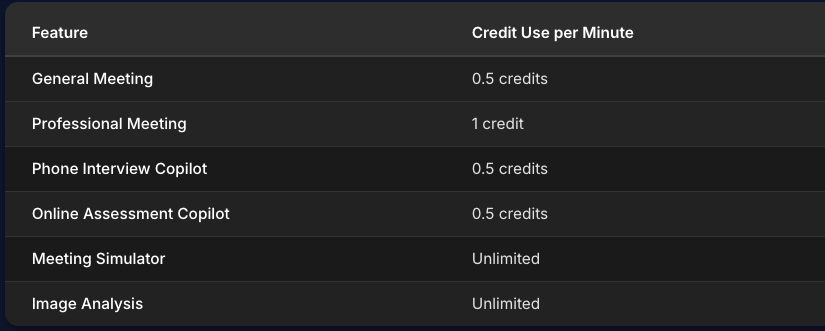
Now map sessions → credits (the exact credit cost depends on the feature and plan). The point is this:
Recruiters won’t tell you this, but… most candidates under-practice by 50% because they’re trying to “be efficient.” Interviewing is a performance skill. You need reps.
If you’re choosing a credits plan, ask one question:
- “How many full sessions can I run before I feel stingy?”
If the answer is “not many,” you’re buying stress, not optimization.
Best plan by timeline (7/14/30 days; multi-round loops)
Timeline is the cleanest way to pick a plan because it forces strategy.
If you have 7 days
Choose the plan that lets you practice hard without friction.
- You’ll likely do 1–2 sessions per day.
- You’ll retake at least a few rounds.
If credits make you hesitate, go unlimited for that week. Your goal is fast feedback loops: attempt → feedback → reattempt.
If you have 14 days
Two weeks is the sweet spot for measurable improvement.
My routine:
- Week 1: build your core answers + fix weak patterns
- Week 2: stress-test under time pressure
If you’re in multiple processes (2–4 companies), unlimited usually wins because your schedule changes daily. That flexibility is leverage.
If you have 30 days
A month means you can plan for consistency.
- If you’re only interviewing at 1 company, credits might be enough.
- If you’re applying broadly and want to increase conversion rate from screens to finals, unlimited is safer.
Multi-round loops (what most people forget to budget for)
A typical loop can be:
- Recruiter screen
- Technical screen
- Hiring manager
- Onsite / virtual onsite (3–5 rounds)
That’s not “one interview.” That’s a sequence.
Here’s the harsh truth: Your plan needs to match the whole funnel, not just the first round. Otherwise you’ll practice a lot early, run out of runway, and wing the onsite.
To understand the difference between credit and unlimited plans in detail, check the official FAQ.
Hidden costs (retakes, coding rounds, onsite days)
Most people budget for the first attempt. Real prep budgets for retakes.
Retakes are not a failure, they’re the mechanism
If you do a mock, get feedback, and stop there, you’re paying for information but not improvement.
Improvement is:
- mock → feedback → repeat
So if your plan only covers “one try,” it’s misaligned.
Coding rounds cost more than you think
Even if LockedIn AI isn’t your only coding tool, technical prep tends to expand:
- you do one mock
- you realize your explanation is messy
- you redo it with cleaner steps
That’s parsing your own thinking into something interview-ready. It takes reps.
Onsite days multiply everything
Onsite (or virtual onsite) is where candidates burn time and money:
- 3–5 rounds in one day
- you need warm-up sessions
- you need debrief + patch weak spots overnight
If you’re using credits, onsite week can drain them fast.
International candidates: add timeline risk
If you need visa sponsorship, delays and extra rounds are common. You may interview with more companies to reduce risk.
That means your prep plan should assume:
- longer timelines
- more loops
- more “surprise” rounds
The cost you’re avoiding isn’t the subscription fee. It’s the cost of a failed loop: lost time, lost offers, and weaker negotiation leverage.
However, it’s important to note concerns raised by The Atlantic about AI in job interviews regarding ethical considerations. Always use AI tools for legitimate preparation, not to misrepresent your abilities.
Cancel/refund basics + billing FAQs
I’m not going to pretend every billing setup is identical across tools, and pricing terms can change. So treat this as a practical checklist, then confirm it on LockedInAI.
My billing checklist (takes 3 minutes)
Before you buy, find answers to:
- Is it a one-time purchase or auto-renewing subscription?
- Can you cancel immediately and keep access until the end date?
- Is there a refund window, and what counts as “used”?
- Do credits expire?
For detailed information about subscription plans, read the official blog post on LockedIn AI subscription plans.
Common “gotchas” I watch for
- Buying a shorter plan, then upgrading later (often costs more than starting with the right window)
- Assuming unused credits roll over (many systems don’t)
- Waiting until day 13 of a 14-day plan to cancel
Recruiters won’t tell you this, but… billing mistakes are usually attention mistakes. Set a calendar reminder the same day you purchase.
If you’re using a card you share with family or you’re on a tight budget, be extra strict here. That’s not paranoia, that’s basic control.
You can also check user reviews on Trustpilot to see real experiences with billing and customer service.
Lower-cost prep stack (policy-safe routines + tools)
If LockedIn AI pricing feels high for your current budget, you still have options. The goal is the same: keyword match + clear value prop + performance reps.
Step 1: Fix the ATS problem (free/low-cost)
ATS is basically parsing your resume and scoring a keyword match against the job description.
Do this:
- Take 1 target job description.
- Highlight hard skills (tools, languages), plus role signals (ownership, metrics).
- Mirror those terms in your resume only if true.
- Add 2–3 quantified bullets (speed, cost, reliability, revenue). Quantify impact.
Stop guessing. Let’s look at the data: if your resume isn’t getting screens, your conversion rate at the top of funnel is the issue, not your interview answers.
You’re optimizing for the interview, but let’s make sure you get the invite first. We built our AI to match your resume against thousands of JDs, fixing the keyword gaps that block you from the screen. Check your match score with JobRight.
Helpful baseline guidance from a trusted source: Indeed’s resume keyword tips.
Step 2: Build a repeatable interview routine (no fancy tools required)
My “policy-safe” routine (meaning: no cheating, no shady behavior):
- 30 minutes: one behavioral story (STAR, but keep it human)
- 30 minutes: one technical explanation out loud
- 15 minutes: tighten your opening pitch (role alignment + value prop)
- 15 minutes: debrief and write the 3 fixes for tomorrow
Do that 5 days per week. That’s 10+ hours per month.
Step 3: Use a simple tool mix
If you can’t go unlimited on LockedIn AI, mix:
- Credits plan (for high-impact mocks)
- A coding practice platform (for repetition)
- A spreadsheet for metrics (sessions completed, weak areas, retake count)
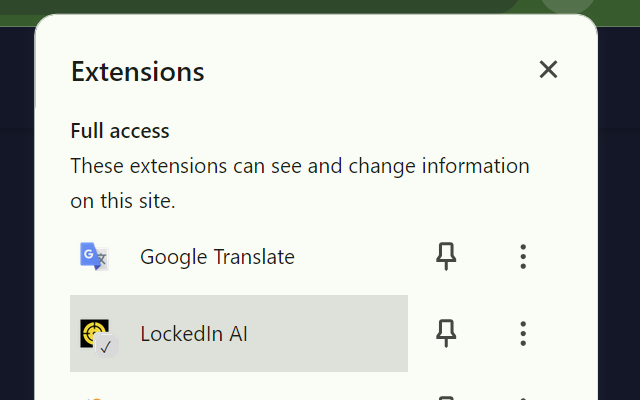
You can also install the LockedIn AI Chrome extension for more convenient access during your practice sessions.
Step 4: For visa sponsorship seekers, focus your pipeline
If you need sponsorship, don’t spray applications into the void.
- Build a list of employers known to sponsor.
- Track responses and iterate.
- Optimize for insider connection: alumni, past coworkers, meetup contacts.
Here’s the harsh truth: mass applying without alignment is just feeding the application black hole.
If you’re the kind of person who wants a clear system and fast feedback, LockedIn AI can be worth it, especially during a packed interview loop. But if you expect one subscription to replace reps, strategy, and consistent practice, skip it. That’s not how performance works.
LockedIn AI Pricing FAQs
What is LockedIn AI pricing based on—credits or unlimited plans?
LockedIn AI pricing generally falls into two buckets: credits-based plans and unlimited plans. Credits plans give you a pool of credits where each AI action consumes credits. Unlimited plans charge a flat rate for a time window, letting you run more sessions without tracking a credit counter.
How do credits work in LockedIn AI pricing for mock interviews and feedback?
In LockedIn AI pricing, credits are typically consumed each time you use an AI action—such as running mock interview sessions, generating answers, or receiving feedback. Exact credit costs vary by plan and feature, so the practical move is to estimate how many full sessions you’ll run weekly and whether retakes will double usage.
Which LockedIn AI pricing plan is best for a 7-, 14-, or 30-day interview timeline?
Match LockedIn AI pricing to your timeline. For 7 days, unlimited is often best if credits make you hesitate—most people need 1–2 sessions daily plus retakes, for 14 days, unlimited usually wins if you’re juggling multiple companies, and for 30 days, credits may work if you’re interviewing lightly at one company.
What hidden costs should I consider with LockedIn AI pricing during multi-round loops?
The biggest hidden cost is retakes: improvement comes from mock → feedback → repeat, not one-and-done. Technical and coding rounds often require more reps than expected, and onsite weeks multiply sessions (warm-ups, debriefs, patching weak spots). Credits can drain quickly when interview rounds cluster.
Where can I find the current LockedIn AI pricing and official plan details?
For accurate LockedIn AI pricing, check LockedIn AI’s official website, since prices and plan terms can change and third-party numbers go stale quickly. Use that page to confirm what’s included, how credits are counted, and whether the plan is a subscription or a one-time time-window purchase.
Recommended Reads