
The Ultimate Guide to LinkedIn Learning & Certifications: What to Learn and How to Showcase It
Table of Contents
In the professional landscape of 2026, the idea of a ‘static CV’ is officially outdated. As companies increasingly rely on AI-driven talent acquisition tools, the way we define and showcase our expertise has changed. We are no longer just ‘job seekers’; we are ‘skill entities’ in a vast digital ecosystem.
LinkedIn remains the most powerful tool in this ecosystem. However, there is a significant gap between acquiring a skill and making it visible to the relevant people (and algorithms). Thousands of professionals complete LinkedIn Learning courses every day, yet many see no increase in recruiter outreach.
Why? Because they treat certifications as trophies rather than data points.
This comprehensive guide will walk you through the strategic selection of LinkedIn certifications for 2026, the psychological impact of different platforms, and the precise technical steps required to ensure your profile is at the top of every recruiter’s search results.
The ROI of Online Credentials in 2026
Before investing forty hours into a “Masterclass,” you must understand the current hierarchy of digital credentials. In 2026, hiring is no longer binary. Recruiters don’t just look for a “Degree: Yes/No.” They look for Skill Freshness.
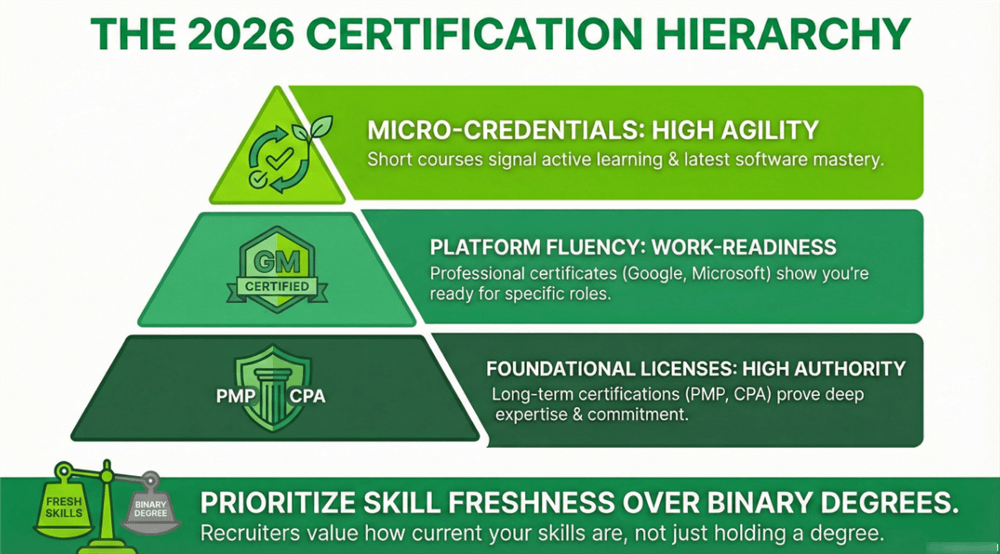
The 3 Tiers of Certification Value
- Foundational Licenses (High Authority): These are your PMPs, CPAs, or AWS Solutions Architect certifications. External bodies usually issue them and represent months of study.
- Platform-Specific Fluency (High Visibility): These are “Career Essentials” or “Professional Certificates” from providers like Google, Microsoft, or IBM, often hosted on Coursera or LinkedIn. They signal that you are “Work-Ready” for a specific role.
- Micro-Credentials (High Agility): These are individual LinkedIn Learning courses (e.g., “Strategic Thinking” or “Advanced Pivot Tables”). They signal that you are an active learner who stays current with minor software updates and soft skill trends.
According to recent discussions in the r/careerguidance community, the consensus among job seekers is that while a single badge might not land the job, the cumulative effect of consistent learning is what builds the profile’s “Authority Score.” As one user noted, “LinkedIn Premium is an investment… It won’t create success for you; it just opens more doors.”
Best LinkedIn Learning Courses for 2026: Top Skills for Your Resume
If you want to move the needle on your profile matching score, you need to focus on skills that are currently experiencing a supply-demand gap. Based on 2026 hiring trends, here are the paths worth your time.
The Rise of “AI-Augmented” Roles
The biggest shift this year is that “AI Skills” are no longer just for developers. The most successful candidates are those who show they can use AI to do their existing job faster.
- The Microsoft + LinkedIn Career Essentials in Generative AI: This remains the “Gold Standard” for free certifications. It covers the ethics of AI, prompt engineering, and how to integrate Copilot into daily workflows.
- AI for Business Leaders: If you are in management, a certification in AI Ethics and Governance is currently more valuable than a generic “Leadership 101” course.
Data as a Universal Language
Whether you are in Marketing, HR, or Finance, data literacy is the baseline.
- LinkedIn Python Certification: Look for courses specifically titled “Python for Non-Programmers” or “Data Wrangling in Python.”
- SQL for Data Analysis: SQL remains the most requested technical skill for mid-level operations roles.
- Excel Mastery: Despite the rise of specialized tools, “Advanced Excel” (including Power Query and VBA) remains a top-five search term for recruiters.
Industry-Specific Heavyweights
- Six Sigma on LinkedIn: For those in manufacturing, logistics, or operations, a Six Sigma certification provides a structured language for “Process Improvement”—a keyword that triggers many high-paying job alerts.
- AWS & Cloud Foundations: As companies move away from physical servers, understanding the “Cloud Ecosystem” is a mandatory skill for any project manager or IT professional.
Coursera vs. LinkedIn Learning vs. Udemy: Which Certificate is Best?
One of the most frequent questions we receive is: “Should I do this on LinkedIn Learning, Coursera, or Udemy?” The answer depends entirely on your end goal.
Quick Reference Table: Where to Start?
| If your goal is… | Focus on… | Best Platform |
| A Salary Bump | AWS, Python, SQL | Coursera / Udemy |
| A Career Pivot | Microsoft Career Essentials | LinkedIn (Free) |
| Visibility/SEO | Skill Assessments & Badges | LinkedIn Learning |
| Technical Niche | Niche Coding Frameworks | Udemy |
1. LinkedIn Learning: The “Native Advantage”
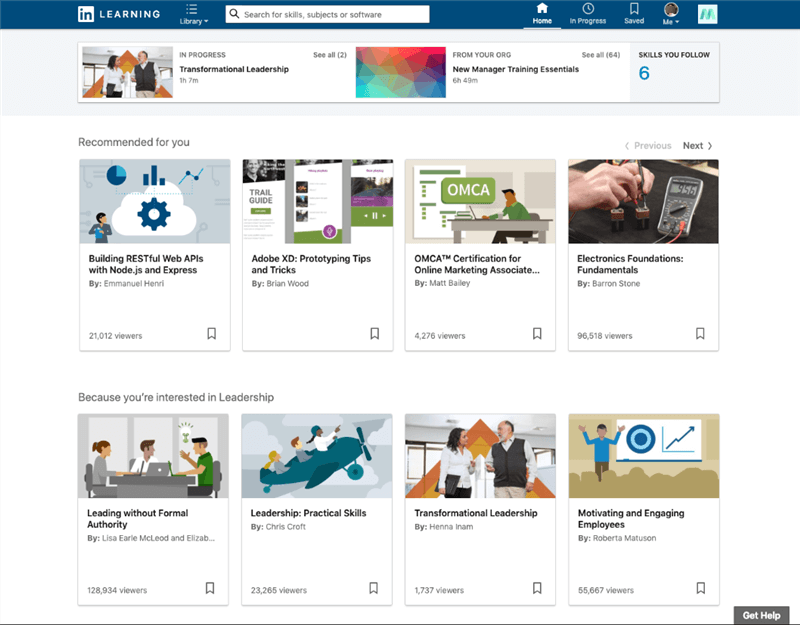
LinkedIn Learning is the best platform for profile optimization. Because it is owned by the same company that controls your professional identity, the integration is seamless.
- Pros: Native “Skill Badges” appear on your profile; courses are often short and digestible; a huge library of soft skills.
- Cons: Not “accredited” in the traditional sense; can sometimes be viewed as “entry-level.”
2. Coursera: The “Academic Heavyweight”
If you are looking for a career pivot, Coursera is your best bet. Because their courses are produced by universities (Yale, Stanford) or industry giants (Google, Meta), they carry more weight during the background check phase.
- Pros: High prestige; university-backed certificates; “Professional Certificates” can take 3–6 months to complete, showing true dedication.
- Cons: More expensive; higher “drop-out” rate due to difficulty.
Also Read: Coursera vs. LinkedIn Learning Pros and Cons >
3. Udemy: The “Skill Specialist”
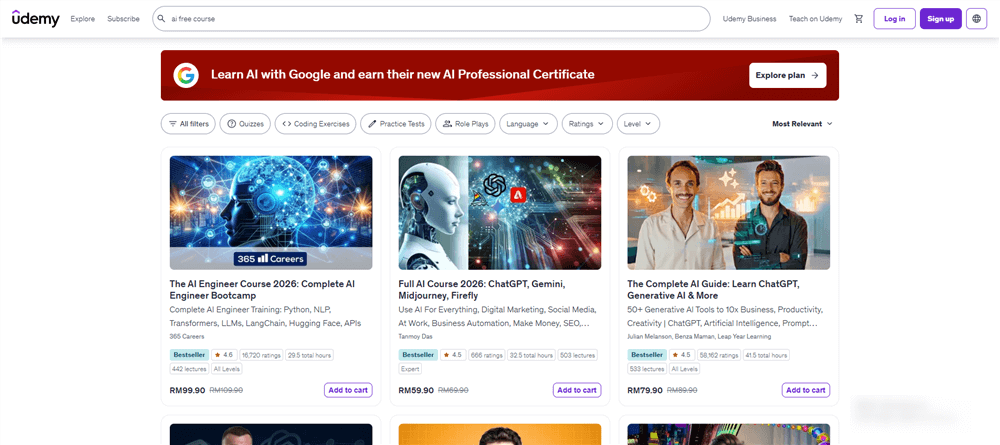
Udemy is the “Wild West” of learning. It is where you go to learn a very specific, niche skill that just came out yesterday.
- Pros: Incredibly cheap during sales ($10–$15); focus on practical “How-to” rather than theory.
- Cons: You cannot “auto-sync” certificates as easily; the quality of instructors varies wildly.
How to Add Certifications to LinkedIn: Tips for Profile Visibility
Adding certifications to LinkedIn is the section where most professionals fail. Completing a course is 50% of the work; the other 50% is ensuring the LinkedIn Algorithm understands what you just did.
The “Discovery Gap”
When a recruiter uses “LinkedIn Recruiter” to find candidates, they don’t search by “Certifications.” They search by “Skills.” If you have a certification in Python but you haven’t listed “Python” in your Skills Section, you will likely not appear in the search results.
To bridge this gap, you must use a strategy we call Strategic Redundancy.
How to Properly Add a Certification (Step-by-Step)
Step 1. The Official Authority: When adding a certificate to your “Licenses & Certifications” section, start typing the name of the issuing organization. Wait for the dropdown menu to appear and select the official company page. This ensures the company logo appears next to your certificate. Profiles with logos are perceived as 70% more “verified” by human eyes.
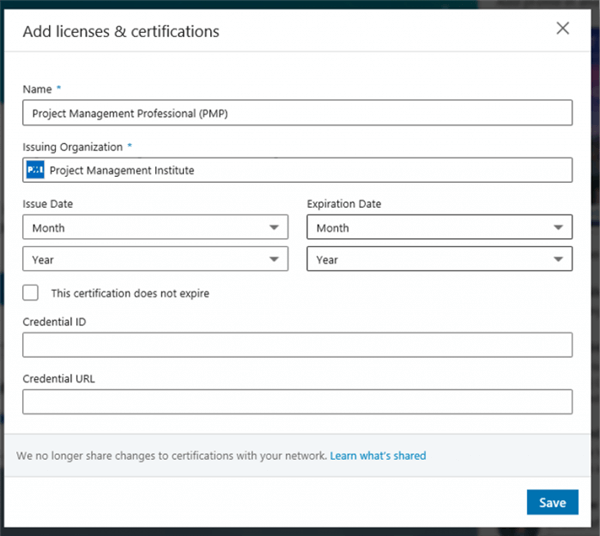
Step 2. The Manual Skill Update: Immediately after adding a certificate (e.g., Google Project Management), go down to your Skills section. Add “Project Management,” “Agile Methodology,” and “Stakeholder Management.” LinkedIn allows 50 skills—use all of them.
Step 3. The “Featured” Spotlight: If your certification involved a final project or a capstone, don’t keep it hidden. Take a screenshot of your work and add it to your Featured section. Write a two-sentence caption: “Just finished my SQL certification. Here is a query I wrote to analyze 1M+ rows of retail data.” This provides the “Proof of Work” that recruiters crave.
How to Add Certificates from External Platforms
Don’t let your work on Coursera or Udemy go to waste. You must manually pull that authority onto your LinkedIn profile.
Adding Coursera Certificates
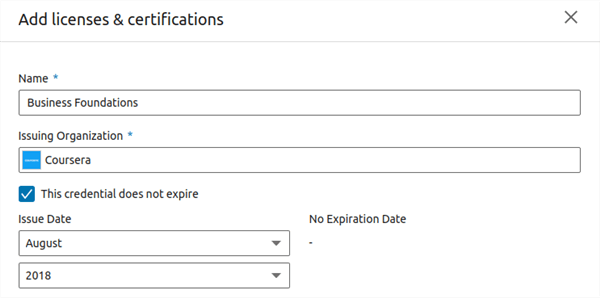
Coursera has a direct “Share to LinkedIn” feature, but it often places the certificate in your “Feed” (where it disappears in 24 hours) rather than your “Profile.”
Go to your Coursera Accomplishments page, copy the “Credential URL,” and manually add it to the “Licenses & Certifications” section on LinkedIn. This makes it permanent and clickable for recruiters.
Adding Udemy Certificates
Since Udemy isn’t a “partner” in the same way Microsoft is, you must be careful with the naming convention.
Pro-Tip: Instead of just writing “Python Course,” write the full name: “Complete Python Bootcamp: From Zero to Hero.” This includes more keywords that the algorithm can index.
Integrating with Jobright.ai
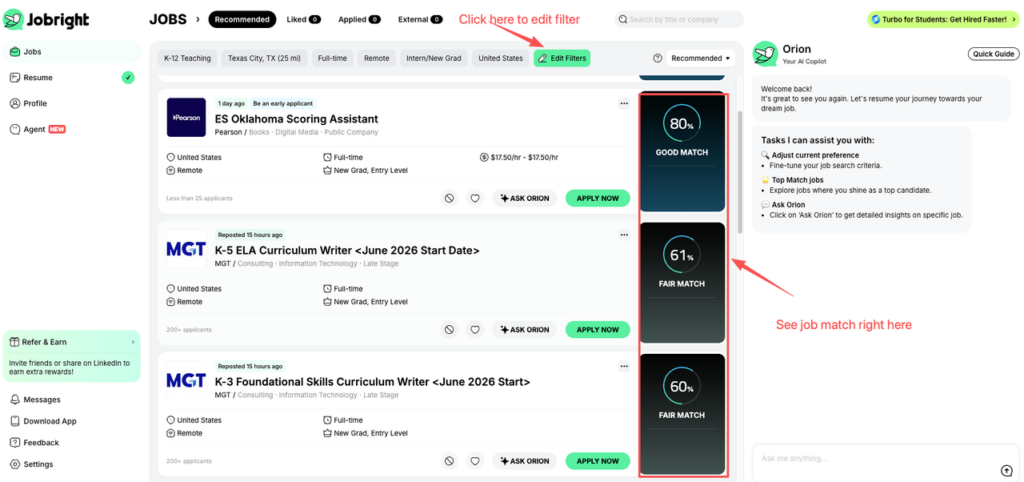
Once your LinkedIn profile is updated, your next step is to sync it with your Jobright.ai dashboard. Our AI will scan your new certifications and automatically recalculate your “Job Match” score. You may find that adding just one “SQL” or “AWS” badge opens up 20% more high-paying roles that were previously hidden from you.
Free LinkedIn Learning Courses with Certificates
You don’t need a $39.99/month subscription to build a world-class profile. LinkedIn and Microsoft have committed to a “Global Skills Initiative,” offering free paths for the most in-demand roles.
The “Top 5” Free Paths Available Now:
- Career Essentials in Software Development: Perfect for those looking to understand the “behind the scenes” of tech.
- Career Essentials in Data Analysis: Covers the basics of Power BI and data visualization.
- Career Essentials in Project Management: Prepares you for entry-level PM roles.
- Career Essentials in Business Analysis: Bridges the gap between tech and business.
- Career Essentials in Generative AI: The most important 2026 credential for staying relevant.
To find these, simply search “LinkedIn Learning Free Career Essentials” in your search bar. These paths include a “Professional Certificate” that is highly regarded because it is co-branded by Microsoft.
The Recruiter’s Perspective — What Happens Behind the Scenes?
To truly master the showcase, you have to understand the “Recruiter UI.” When a hiring manager looks at your profile, they spend an average of 6 seconds scanning for three things:
- The Logo Test: Does this person have certifications from names I recognize (Google, Microsoft, AWS)?
- The Verification Badge: Does this person have the “Skill Badge” (earned by passing a 15-minute LinkedIn Assessment)?
- Recent Activity: Does it look like this person has learned anything in the last 6 months?
As noted on Reddit: “The certificates don’t magic doors open… You need to actually talk about what it did for you.”
The most successful candidates are those who take a course, add the skill, and then write a short post about one thing they learned. This triggers the algorithm to show your profile to your network, often leading to the “hidden job market” of referrals.
Boost Your Job Match Score: Using Jobright.ai with LinkedIn Skills
In the 2026 job market, simply having a certification isn’t enough—you need to know exactly how that certification moves the needle for specific roles. This is where Jobright.ai transforms your job search from a manual grind into a data-driven strategy.
How Jobright.ai Powers Your Post-Certification Success
While LinkedIn provides the platform for visibility, Jobright.ai provides the engine for conversion. Here is how the platform works in tandem with your new LinkedIn credentials:
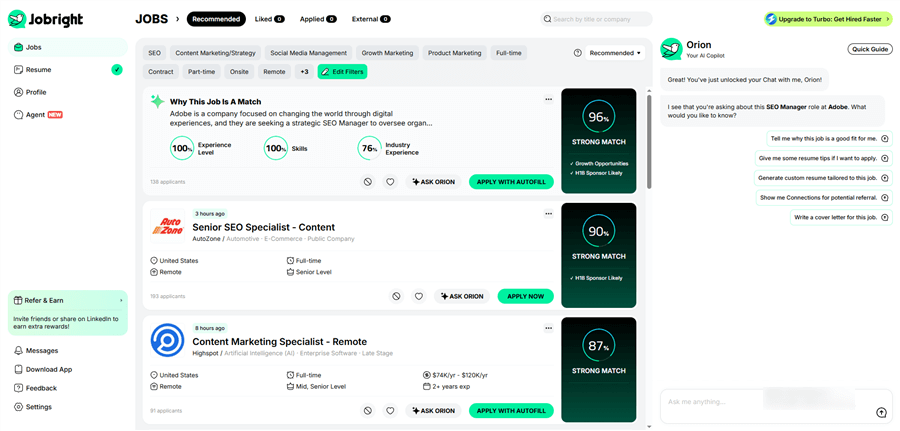
- Real-Time Match Scoring: Once you add a new skill—like Python or SQL—to your profile, Jobright’s AI immediately updates your Match Score across millions of active job listings. It shows you exactly which roles you are now 80% or 90% qualified for, allowing you to prioritize high-probability opportunities.
- The “Orion” AI Co-Pilot: If you’re unsure which certification to take next, you can ask Orion, Jobright’s built-in AI assistant. Orion analyzes current market trends and your specific resume to suggest the “missing link” skill that will unlock the next salary tier.
- Verified Job Discovery: One of the biggest hurdles in 2026 is “ghost jobs” and duplicate listings. Jobright’s algorithm actively squashes fake jobs in real-time, ensuring that when you apply with your new certifications, you are reaching a verified, hiring company.
- AI-Tailored Resume Generation: Jobright doesn’t just use one resume. For every job you target, it can generate a custom, ATS-friendly resume that highlights your most relevant certifications and skills in under 60 seconds.
- Insider Connections: Landing a job often requires a human touch. Jobright identifies alumni or former colleagues at your target companies and provides AI-generated outreach templates to help you ask for referrals based on your shared background or new certifications.
The ultimate goal of earning a LinkedIn Certification is to be found by the right people at the right time. By syncing your optimized LinkedIn profile with Jobright, you ensure that your hard work in the “classroom” translates directly into interviews in the boardroom.
Pro Tip: Use the Jobright Chrome Extension to instantly see your Match Score while browsing LinkedIn jobs. It’s the fastest way to know if your certifications have successfully bridged the gap to your dream role.
Troubleshooting Common Issues
“I added my certificate but my profile strength didn’t go up.”
This usually happens because you didn’t link the certificate to a specific Skill. In 2026, LinkedIn requires you to “attach” skills to each entry in your experience and certification sections. Edit your certification and look for the “Skills” bubble at the bottom.
“Should I add my Six Sigma White Belt if I’m not an engineer?”
Absolutely. In 2026, “Process Thinking” is a universal requirement. Even if you are a Content Creator or an HR Generalist, showing that you understand “Efficiency Methodologies” sets you apart from candidates who only have “soft” skills.
Conclusion
Earning a LinkedIn certification is an act of Career Self-Defense. In an era where AI is rapidly changing job descriptions, the ability to learn a new tool and showcase it effectively is the only true job security.
To recap your 2026 Strategy:
- Prioritize: Focus on “AI Literacy,” “Data Fluency,” and “Cloud Foundations.”
- Optimize: Use the “Double-Entry” method—add the license, then manually update your Skills Section.
- Verify: Take the LinkedIn Skill Assessments for every course you finish to get the “Verified” badge.
- Connect: Sync your updated profile with Jobright.ai to see how your new skills translate into real-world salary increases and job matches.
Your career is a project in perpetual beta. The tools you use today might be obsolete by 2028, but your ability to master the LinkedIn ecosystem will remain your greatest asset.
FAQs: Mastering the LinkedIn Credential Ecosystem
Is LinkedIn Learning free, or do I need Premium?
While LinkedIn Learning is primarily a subscription-based service (included with LinkedIn Premium), there are several ways to access it for free:
- Public Libraries: Many local libraries offer free access to LinkedIn Learning with a valid library card.
- Corporate/Academic Accounts: Check if your employer or university provides a “Learning License.”
- The Global Skills Initiative: As mentioned earlier, specific “Career Essentials” paths from Microsoft and LinkedIn remain free to the public to support high-growth industries.
Do LinkedIn Learning certificates show up on my profile automatically?
Usually, yes. Upon completion, you will receive a prompt to “Add to Profile.” However, to maximize the Double-Entry SEO Strategy, you should always double-check that the “Skills” associated with the course were also added to your separate Skills Section. If you simply share the certificate to your “Feed,” it will eventually get buried; ensure it is permanently housed in the Licenses & Certifications section.
Can I add external certificates (like Udemy or Coursera) to LinkedIn?
Absolutely. In fact, for 2026 SEO, it is highly recommended.
- Coursera: Use the “Share to LinkedIn” button in your Coursera portal or manually copy the “Credential URL” into your LinkedIn profile to make it verifiable.
- Udemy: Since Udemy doesn’t always have a direct sync, you must add it manually under “Licenses & Certifications.” Be sure to use the exact course name to ensure keyword indexing.
How should I list these certificates on my physical resume?
Do not clutter your “Education” section with micro-credentials. Instead, create a dedicated section titled “Professional Development” or “Technical Certifications.” * Format: [Course Name], [Platform] – [Year].
- Example: “Data Analysis with Python, LinkedIn Learning – 2026.”
- Jobright Tip: Only list the top 3–5 certificates that are directly relevant to the specific job you are applying for.
Which is better for my career: Coursera or LinkedIn Learning?
It depends on your goal.
- Choose Coursera if you are making a major career pivot (e.g., from Sales to Data Science) and need the academic prestige of a university-backed credential.
- Choose LinkedIn Learning if you are looking to “upskill” in your current role, learn a new software tool quickly, or boost your profile visibility with recruiters.
Does a “Six Sigma” or “Python” certificate from LinkedIn count as a professional license?
No. It is important to distinguish between a Certificate of Completion (which LinkedIn Learning provides) and a Professional Certification (which requires an independently proctored exam). For example, a LinkedIn course prepares you for the Six Sigma exam, but it is not the exam itself. Always clarify this on your profile to maintain credibility: “Coursework completed for Six Sigma Green Belt.”
What is a LinkedIn “Skill Badge,” and how do I get one?
A Skill Badge is earned through a LinkedIn Skill Assessment—a timed, multiple-choice quiz. These are different from Learning certificates. In 2026, having a “Verified” Skill Badge for high-demand keywords like Excel, Python, or Project Management can increase your chances of appearing in a recruiter’s “Top Applicant” list by nearly 30%.