
How to Convert Your Resume into a Great LinkedIn Profile (2026 Guide)
Table of Contents
In the modern job market, your professional identity exists in two distinct dimensions.
A resume is a historical document. It is a static, formal record of where you have been, designed to be read by an Applicant Tracking System (ATS) or a recruiter for exactly six seconds. It is a rearview mirror.
A LinkedIn profile is a living lead magnet. It is a dynamic, social, and search-optimized landing page designed to attract opportunities while you sleep. It is your windshield, looking forward at where you are going.
The biggest mistake job seekers make in 2026 is the “Copy-Paste Trap.” They take the dry, bulleted text from their resume and dump it into their LinkedIn profile. This is a strategy for invisibility. Why? Because LinkedIn is a search engine, not a file cabinet. If you don’t rewrite your content for the platform, you miss out on the nuance of LinkedIn SEO, the psychological triggers of social proof, and the ability to tell a narrative that a one-page PDF simply can’t hold. This guide will show you how to bridge that gap using a strategic, AI-enhanced framework.
Resume vs. LinkedIn Profile: What’s the Difference?
Understanding the fundamental differences between these two tools is the first step toward a successful conversion. While they should be consistent in terms of dates and titles, their vibe and function are worlds apart.
| Feature | Resume | LinkedIn Profile |
| Primary Goal | Get an interview for a specific role. | Build a brand and attract diverse opportunities. |
| Primary Reader | ATS Algorithms & Hiring Managers. | Recruiter Search Filters & Professional Peers. |
| Tone | Formal, 3rd-person, objective. | Conversational, 1st-person, narrative. |
| Length | Strictly 1–2 pages. | Virtually unlimited (but optimized for “scrolling”). |
| Visuals | Text-heavy, black and white. | Multimedia-rich (Photos, Videos, Links). |
| Persistence | Static; sent only when you apply. | Dynamic; updated in real-time. |
| SEO Focus | Matching a specific Job Description. | General industry keywords & skills. |
How to Upload Your Resume to LinkedIn (3 Official Methods)
Before we get into the “how-to” of rewriting, let’s address the technical mechanics. There are three primary ways to get your resume onto the platform.
Method 1. The “Featured” Section (Public Branding)
This is the most visible way to showcase your resume. The Featured section sits right below your About section.
How to do it: Click “Add profile section” > “Recommended” > “Add featured.” Click the “+” icon and select “Media” to upload your file.
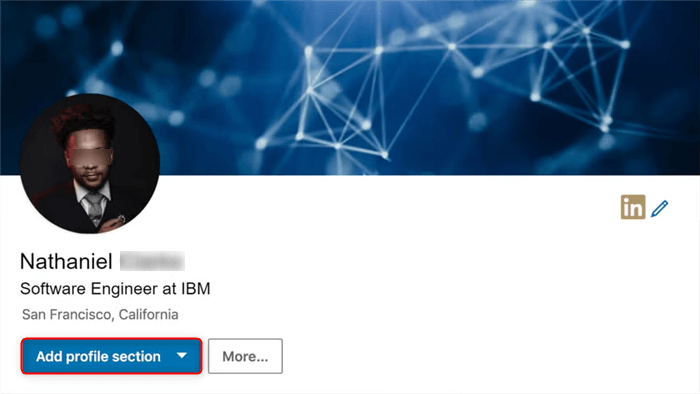
It allows recruiters to download your resume immediately without having to ask for it.
Method 2. The “Easy Apply” Resume Vault
LinkedIn keeps a private “vault” of your resumes for when you use the “Easy Apply” feature.
Step 1. Open LinkedIn Settings
Click your profile icon in the top-right corner of LinkedIn, then select “Settings & Privacy.”
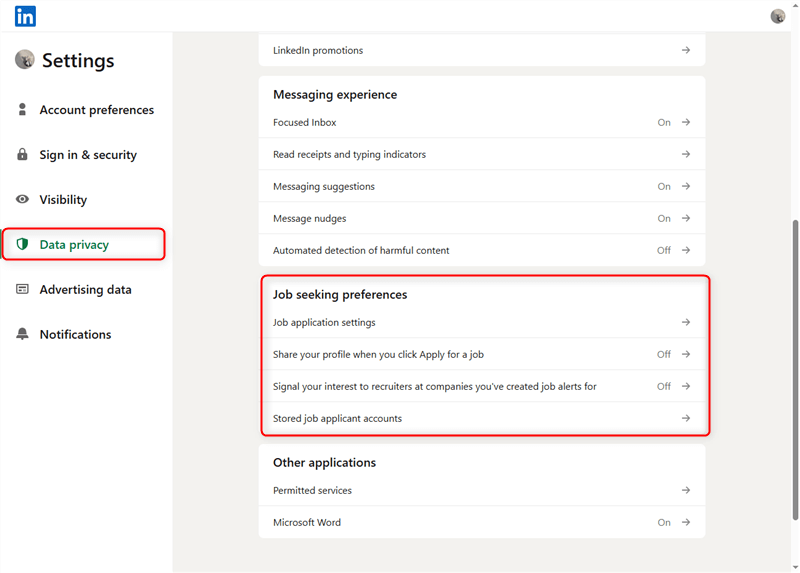
Step 2. Navigate to Data Privacy
In the left sidebar, click “Data Privacy.”
Step 3. Find Job Seeking Preferences
Scroll down to the “Job Seeking Preferences” section.
Step 4. Open Job Application Settings
Click “Job Application Settings.” Here you can manage the resumes LinkedIn stores for Easy Apply job applications.
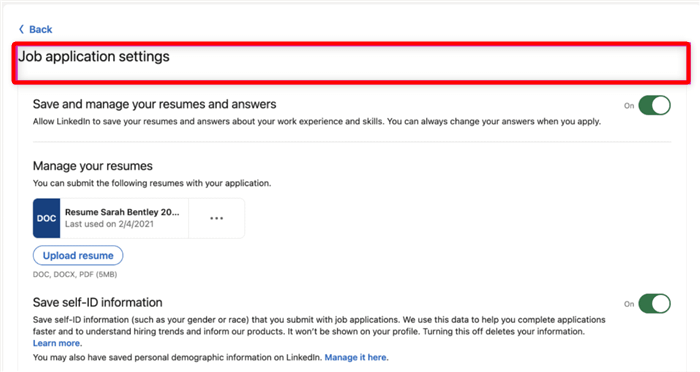
You can store multiple versions of your resume (e.g., one for Project Management, one for Product Marketing) and toggle between them depending on the job.
Method 3. The LinkedIn Auto-Profile Builder
LinkedIn offers a tool to “Create from Resume” when you are setting up your profile.
How to do it: Click “More” on your profile introduction and select “Build a resume.” You can then choose to “Import from resume.”
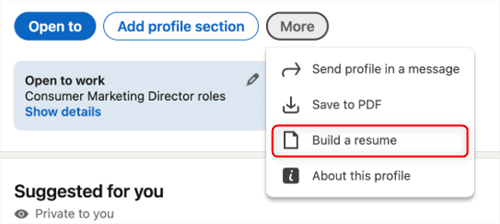
Warning: This often results in “Formatting Explosions.” LinkedIn’s parser isn’t perfect; it might put your education in your experience section or break your bullet points. Use this only as a very rough draft.
Pro Tip: Always Use PDF. Never upload a .docx file to your Featured section. PDF ensures that your formatting remains identical regardless of whether the recruiter is looking at it on a 30-inch monitor or an iPhone.
The 3-Step Framework to Convert Your Resume Into a LinkedIn Profile
Don’t just move text. Move intent. Use this framework to ensure your profile performs.
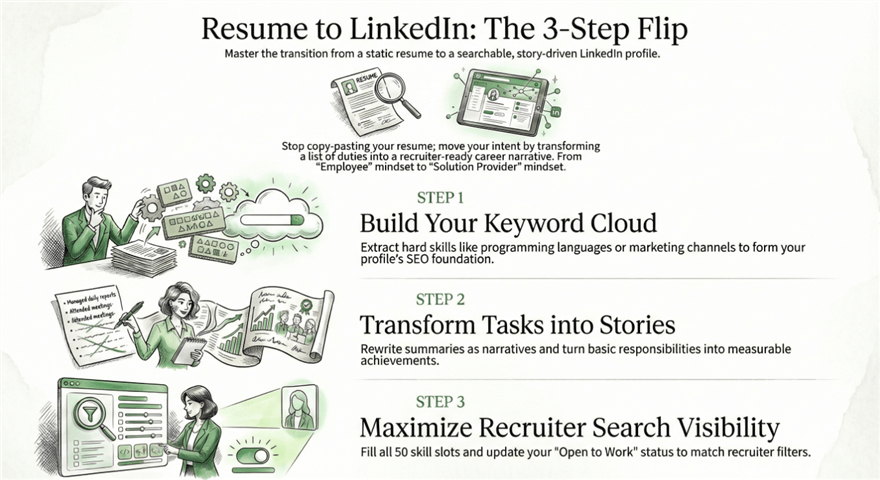
Step 1: Extract Resume Keywords
Scan your current resume for the “Hard Skills” and “Keywords” that define your career. If you are a Software Engineer, these are your languages (Python, Java). If you are in Marketing, these are your channels (SEO, SEM).
Goal: Create a “Keyword Cloud” that will serve as the foundation for your LinkedIn SEO.
Step 2: Rewrite Profile Sections
This is where the transformation happens. Take your “Professional Summary” and turn it into a “Story.” Take your “Responsibilities” and turn them into “Achievements.”
Goal: Change the tone from “I am an employee” to “I am a solution provider.”
Step 3: Optimize for Recruiter Search
Recruiters use a tool called LinkedIn Recruiter. They filter by Location, Job Title, Skills, and “Open to Work” status.
Goal: Ensure your “Skills” section has all 50 slots filled with the keywords extracted in Step 1.
How to Turn Resume Content Into a Powerful LinkedIn Profile
Let’s look at the specific sections that require a “facelift.”
Part 1. The Headline Formula
Your resume headline is usually just your job title. On LinkedIn, your headline is the most important SEO real estate you own.
- The Formula: [Target Job Title] | [Key Skill/Industry] | [Quantifiable Achievement or “The How”]
- Example: Senior Growth Marketer | SaaS & B2B | Helped 3 Startups Scale from $0 to $10M ARR
Users on r/jobsearchhacks emphasize that “Looking for opportunities” is a waste of a headline. Recruiters don’t search for “looking for work”; they search for “Javascript Developer.”
Part 2. The “About” Section: 3rd Person → 1st Person
Your resume summary says: “Results-oriented professional with 10 years of experience…”
Your LinkedIn About section should say: “I love solving complex data problems. Over the last decade, I’ve focused on…”
Why? First-person language builds trust. It makes the reader feel like they are having a conversation with you.
Part 3. The Experience Section: Action + Result + Tool
On a resume, you might say: “Managed a team of five to increase sales.”
On LinkedIn, you should use the ART Framework:
- Action: Led a cross-functional team of five.
- Result: Generated a 25% increase in quarterly revenue.
- Tool: Using Salesforce and HubSpot for lead tracking.
- Visuals: Attach a link to the project or a screenshot of the results to add “Social Proof.”
How Recruiters Actually Search LinkedIn Profiles
To convert your resume successfully, you must understand the “Search Engine” aspect of LinkedIn. Recruiters don’t browse; they filter.
When a recruiter opens LinkedIn Recruiter, they see a dashboard with these primary filters:
- Job Titles: They search for current and past titles. If your resume title is “Internal Consultant II” but you do Project Management, your LinkedIn title should reflect “Project Manager.”
- Location: They often filter by “Radius” around a city.
- Skills: This is a “Boolean” search. If they need “Python” AND “AWS,” and you only have “Python” on your profile, you are invisible.
- Keywords: This scans your Headline and About section.
The takeaway? Your LinkedIn profile needs to be broader than your resume. Your resume is tailored for one job; your LinkedIn must be optimized for your entire industry.
How to Update Your LinkedIn Profile Without Alerting Your Boss
This is the #1 fear on Reddit. You want to convert your resume, but you don’t want your manager to see the “Jane Smith updated her profile” notification.
Step 1. Go to Settings: Click your profile picture > Settings & Privacy.
Step 2. Visibility: Click “Visibility” on the left sidebar.
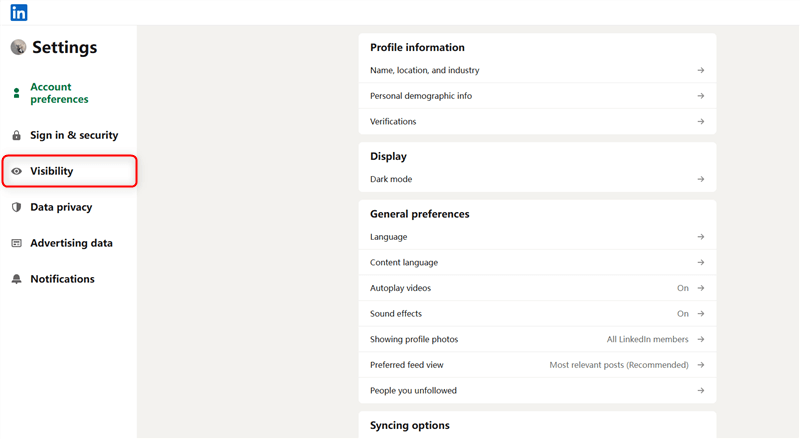
Step 3. Share Profile Updates: Set “Share key profile updates with your network” to OFF.
Step 4. Edit Safely: Now, every time you change a bullet point or add a skill, your network (including your boss) won’t receive a notification.
On r/linkedin, users suggest doing your major updates over a weekend or late at night as an extra layer of “psychological” privacy.
Can AI Convert a Resume Into a LinkedIn Profile?
In 2026, the answer is Yes, but with a human touch.
Tools like ChatGPT or specialized career AI can take your resume text and:
- Rewrite it in the 1st person.
- Suggest LinkedIn headlines based on your experience.
- Identify keyword gaps between your resume and industry standards.
The Limitation: AI doesn’t know your “Personal Brand.” It can generate the text, but it can’t choose the stories that define your career. Use AI for the first draft, but edit for your unique voice.
How Jobright Helps Optimize Your Resume and LinkedIn Strategy
This is where Jobright provides a significant advantage. Instead of manually guessing whether your resume and LinkedIn profile align with your target roles, Jobright uses AI-driven analysis to guide your job search.
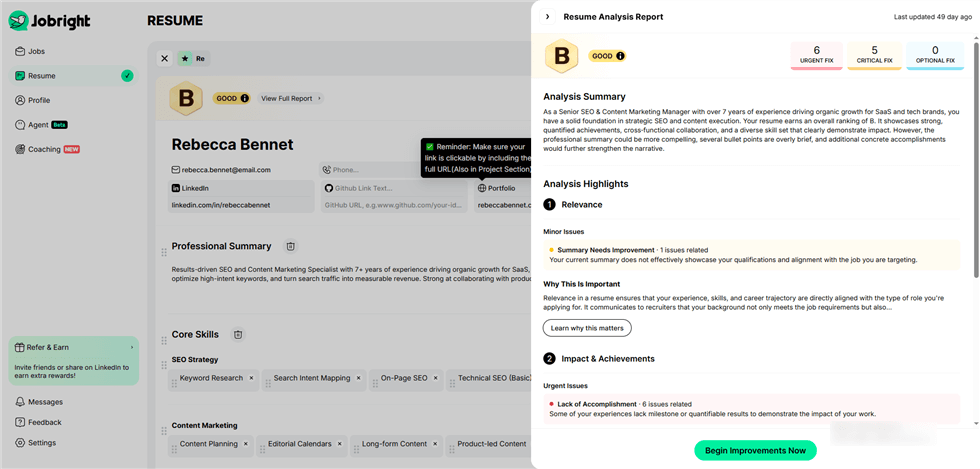
AI Job Matching
Jobright’s AI analyzes your resume, skills, and preferences, then compares them against thousands of job descriptions to identify roles where you are most likely to succeed. This matching system helps job seekers focus on positions where their experience is truly relevant.
Resume Tailoring for Each Role
One of Jobright’s strongest capabilities is automated resume customization. The platform can generate job-specific resumes that highlight the most relevant skills and achievements for each position, helping candidates pass ATS screening and improve recruiter visibility.
AI Career Guidance
Jobright’s AI agent also acts as a career copilot, analyzing your resume and identifying areas where your profile may need improvement. It can provide recommendations to strengthen your application strategy and improve your chances of landing interviews.
Together, these tools help ensure that your resume, LinkedIn profile, and job applications present a consistent and compelling professional story to recruiters.
Example: Resume → LinkedIn Transformation
Before (Resume Style)
Professional Summary: Dedicated Customer Success Manager with 5 years of experience in SaaS. Proven track record of reducing churn and increasing upsell opportunities. Expert in Salesforce and ZenDesk.
After (LinkedIn Style)
About Section: I believe that a product is only as good as the success it brings to the user.
For the past 5 years, I’ve been on the front lines of the SaaS world, helping companies like [Company A] and [Company B] turn “trial users” into “lifelong advocates.”
My focus:
⚡ Reducing churn (I cut it by 15% last year alone).
⚡ Strategic Upselling (Generated $200k in new ARR).
⚡ Building Customer Education programs from scratch.
When I’m not in Salesforce, you can find me mentoring junior CSMs or writing about the future of CX. Let’s connect!
Common Mistakes When Turning a Resume Into LinkedIn
- The Copy-Paste Wall of Text: Long paragraphs are death on mobile. Use bullet points and white space.
- Generic Headlines: If your headline is just your current job title, you are only searchable for that one title.
- Missing a Headshot: A profile with a photo gets 21x more views and 9x more connection requests than one without.
- Ignoring the “Skills” Section: If you don’t map your resume skills to LinkedIn’s standardized skill list, the search algorithm won’t “see” you.
FAQ
Should LinkedIn match your resume?
The facts (dates, titles, companies) must match perfectly to pass a background check. However, the content should be more detailed and narrative-driven on LinkedIn.
Can recruiters see your resume?
Only if you upload it to the “Featured” section or send it to them. They cannot automatically see the resumes you’ve saved in your “Easy Apply” vault.
Should LinkedIn be longer than a resume?
Yes. While a resume is limited to 2 pages, your LinkedIn can include a deeper dive into projects, a long list of skills, and multimedia evidence of your work.
Can LinkedIn replace a resume?
Not yet. Most formal applications still require a PDF resume. However, your LinkedIn profile is often the reason a recruiter asks for your resume in the first place.
Conclusion: Beyond the Document
Converting your resume to a LinkedIn profile is more than just a digital copy-paste; it’s an evolution from searching for opportunities to attracting them. In the fast-paced 2026 job market, a resume might get you through the door, but a strategically optimized LinkedIn profile is what makes the recruiter knock on that door in the first place.
By shifting from a static record of the past to a dynamic narrative of your future value, you ensure that you aren’t just visible—you’re undeniable. Remember, your profile works 24/7. While you’re sleeping, networking, or even working your current job, your “digital twin” is out there pitching your skills to the world. Make sure it’s telling the right story.
Don’t let your hard-earned experience get lost in the noise. Take the tactical steps, embrace the “Stealth Mode” for safety, and use AI tools to bridge the gap between where you are and where you want to be.