
How to Write a High-Converting LinkedIn Summary & Headline (with 20+ Examples)
Table of Contents
TL;DR
- LinkedIn in 2026 is a search-driven personal landing page, not a resume.
- Front-load your target job title and keywords to rank in recruiter searches.
- Use a 3-part headline: Title + Hard Skills + Metric or Value.
- Write your summary as a story: Hook → Problem Solving → Proof + CTA.
- Test, measure, and refine using profile views, search data, and real results.
In 2026, the job market has shifted from “who you know” to “who can find you.” LinkedIn is no longer just a digital resume; it is your personal landing page. With over 1 billion users and an AI-driven recruiter search interface, your LinkedIn profile has approximately 6 to 8 seconds to convert a profile viewer into an interview request.
If your headline is just your job title and your “About” section is a dry paragraph of corporate jargon, you are losing opportunities to competitors who understand LinkedIn Search Visibility and Conversion Optimization.
In this guide, we’ll break down the exact formulas to write a high-converting LinkedIn headline and summary, backed by data, recruiter insights from Reddit and LinkedIn, and specific examples for students, sales pros, project managers, and more.
The Anatomy of a High-Conversion Headline – 2 Points
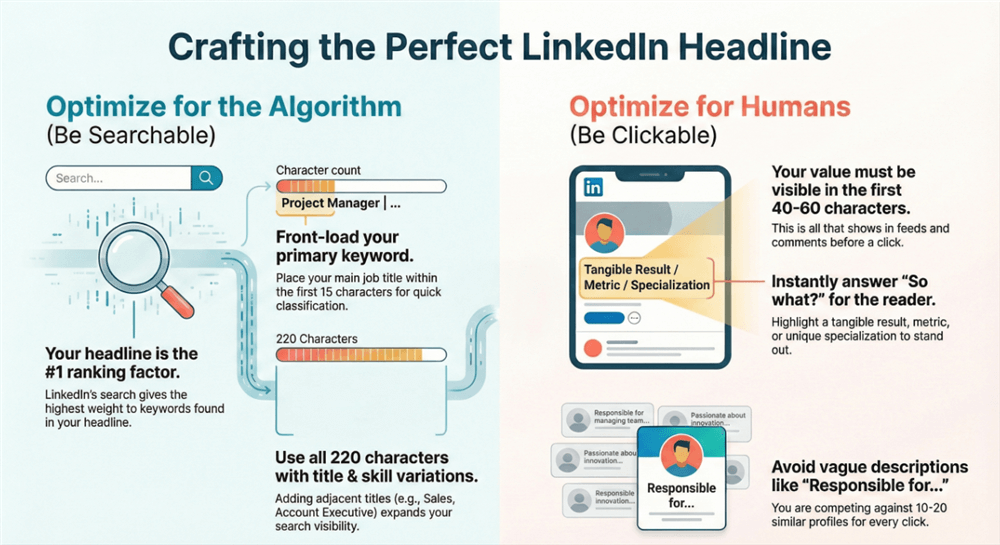
The default LinkedIn setting usually pulls your current job title and company (e.g., Software Engineer at Google). While prestigious, it lacks context and keywords. A high-converting headline uses all 220 available characters to satisfy two specific “masters.”
Master 1: The LinkedIn Algorithm (The “Searchable” Part)
Recruiters don’t search for names — they search for skills and standardized job titles. LinkedIn’s algorithm assigns the highest weighting to matches found in the Headline, making it the single most important field for discovery.
To maximize visibility, place your primary job title (your core keyword) within the first 15 characters of your headline. This ensures immediate classification within LinkedIn’s professional taxonomy before secondary signals are evaluated.
Skill & Title Variations Matter:
Use industry-standard and adjacent titles to expand semantic reach. For example, if your role is “Sales,” also incorporate recognized equivalents such as Account Executive, Business Development, or Revenue Growth. This allows the algorithm to associate your profile with multiple, high-intent search clusters without diluting relevance.
Master 2: The Human Recruiter (The “Clickable” Part)
Once you appear in a search result, you’re competing with 10–20 nearly identical profiles. At that stage, discovery shifts from algorithmic ranking to human pattern recognition, and the human eye scans for differentiation in seconds.
The “So What?” Factor:
Why should they choose you over someone with the same title? Your headline must answer this instantly with a clear outcome, metric, or specialization. Not generic role descriptions.
The Feed Hook Effect:
When you comment on a post, LinkedIn only displays the first 40–60 characters of your headline. If your value proposition isn’t front-loaded, your comment blends into the feed — and you’re effectively invisible, even when you’re active.
How to Write a High-Converting LinkedIn Headline (The 3-Part Formula Breakdown)
To create a headline that ranks well and converts at the human review stage, you must balance three core components. Each serves a distinct function in both algorithmic classification and recruiter decision-making.
Component A: The Target Job Title
Use the title of the job you want, not just the one you currently hold. LinkedIn’s AI prioritizes intent and role alignment. If your profile signals readiness for the next role, the algorithm will classify you accordingly.
Strategy: If your current title is Marketing Associate but you’re actively targeting Growth Marketing Manager roles, your headline should reflect Growth Marketing Manager — provided your experience and skills credibly support it.
Component B: The Hard-Skill “Power Pair”
Select two in-demand technical skills, tools, or methodologies that are strongly associated with your target role. These act as secondary discovery triggers, expanding your visibility across related searches.
Examples:
- Developers: React | AWS
- Marketers: HubSpot Certified | Search Visibility Strategy
- HR: Talent Acquisition | DE&I Strategy
Component C: The Metric-Driven Achievement (The Closer)
Include a trust signal — a quantified outcome that proves real-world impact. The AI uses metrics to assess seniority and result complexity; recruiters use them to validate credibility.
Weak: “Experienced in sales.”
Strong: “Generated $2M+ in new business revenue in 2025.”
If it isn’t quantified, it carries minimal weight.
The Winning Headline Formula
Stop using the default “Job Title at Company” format. It underperforms in both search and conversion. Use this high-impact framework instead:
[Target Job Title] | [Key Hard Skill or Expertise] | [Unique Value Proposition or Metric-Driven Achievement]
This structure ensures your headline is classified correctly, differentiated instantly, and trusted immediately — by both AI systems and human recruiters.
Comparison Table: Good vs. Great Headlines
| Level | “Good” (Standard) | “Great” (High-Converting) |
| Student | Marketing Student at NYU | Aspiring Growth Marketer |
| Sales | Senior Sales Account Manager | Senior SaaS Account Executive |
| Project Manager | PMP Certified Project Manager | Senior Project Manager |
| Data Science | Data Analyst | Data Scientist |
LinkedIn Headline Examples for Students & Freshers
As a student or recent graduate, the biggest mistake is listing your status (e.g., “Student at UCLA”) without mentioning your skills. Recruiters don’t search for “students”; they search for specific job titles, such as “Java Developers” or “Graphic Designers.”
Headline Strategy for Students and Freshers:
- Focus on the Future: State the role you are qualified for.
- Highlight Academic Proof: Use GPA (if 3.8+), certifications, or major projects.
- Showcase Technical Stacks: List the tools you’ve mastered.
5 Student Headline Examples:
- Computer Science Student | Full-Stack Developer (React/Node.js) | 3x Hackathon Winner | Seeking Summer 2026 Internships
- Aspiring HR Professional | Psychology Graduate | Specialized in DE&I & Conflict Resolution | SHRM-CP Candidate
- Data Science Fresher | Python, SQL, Power BI | Analyzing 1M+ Data Points for Financial Research Project
- Finance Student at LSE | Investment Banking Aspirant | Level I CFA Candidate | VP of Finance Society
- Graphic Design Graduate | Adobe Creative Suite & Figma | Focus on Brand Identity & UX Design | View Portfolio in Featured Section
High-Conversion Headline Templates by Industry
Use these templates to “fill in the blanks” for your specific career path:
| Persona | The High-Conversion Template |
| SaaS Sales | Senior Account Executive |
| Data Science | Data Scientist |
| UX Design | Senior UX Designer |
| New Grad | Aspiring Software Engineer |
| Career Changer | Project Manager (Transitioning from Teaching) |
The “3-Part Story” Summary Framework (The About Section)
The LinkedIn Summary (About section) is where you close the deal. However, LinkedIn truncates this section. On mobile, users only see the first two lines before they have to click “See More.”
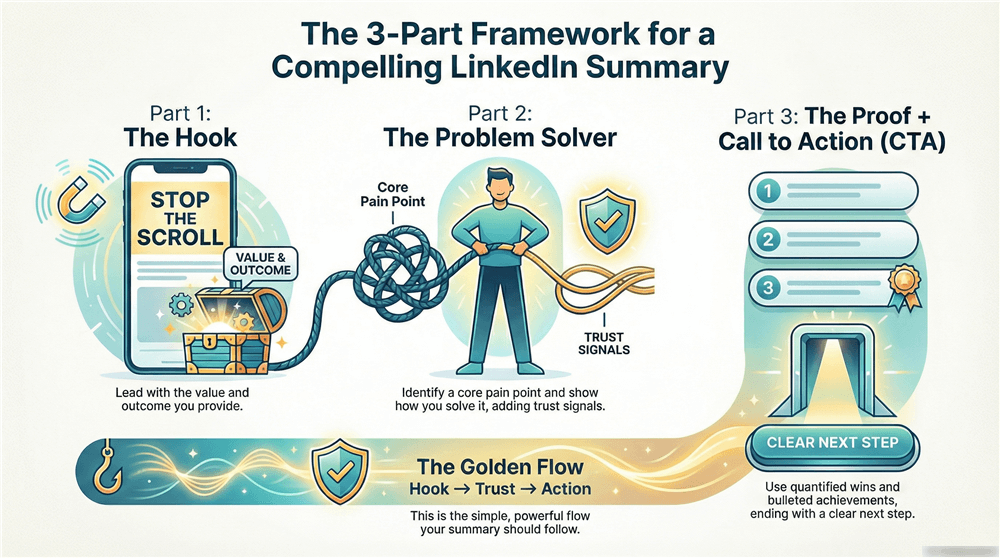
Part 1: The Hook (The First 3 Lines)
The goal of the hook is to stop the scroll. Avoid: “I am a highly motivated professional with 10 years of experience…”
Instead, try: “I help SaaS companies scale from $1M to $10M ARR by building high-performing outbound sales teams.”
Part 2: The Meat (The Problem-Solver Narrative)
Don’t just list what you do; explain how you solve problems.
- What is the #1 pain point in your industry?
- How do you specifically address it?
- What are the “Trust Signals” (awards, big-name clients, certifications) that prove you’re the expert?
Part 3: The Proof & Call to Action (CTA)
End with a bulleted list of “Key Achievements” and a clear instruction on how to reach you.
Example CTA: “Currently open to Senior Product Management roles in Austin or Remote. Let’s connect or email me at [email].”
LinkedIn Summary Examples (Categorized)
LinkedIn Summary for Students & Freshers
For students and freshers, an effective LinkedIn summary focuses on future potential, practical skills, and early proof of impact—rather than just academic status.
Example Structure (Entry-Level / New Grad):
“I didn’t just study marketing — I practiced it. While pursuing my degree, I noticed local businesses struggling to gain traction on short-form video platforms. I launched a small freelance project that helped multiple local brands grow their social presence to 50K+ combined followers within six months.
Now, as a recent graduate, I’m looking to bring that same growth-first, experiment-driven mindset into a full-time Social Media or Digital Marketing role.
Skills: Content Strategy, Short-Form Video Editing, Meta Ads, Community Management
Honors & Activities: Dean’s List, Marketing Club Leadership”
👉Public graduate profile with quantified early-career outcomes from Akin on LinkedIn.
These profiles focus on initiative + measurable outcomes, not just coursework — exactly what recruiters and AI ranking systems reward.
LinkedIn Summary for Sales Professionals
For sales professionals, a LinkedIn summary should highlight measurable results, territory impact, and revenue achievements to instantly demonstrate credibility.
Example Structure (Quota-Carrying / Enterprise Sales):
“I turn ‘No’ into ‘Not yet.’ Over the last 7 years, I’ve specialized in breaking into high-resistance enterprise accounts in technically complex markets.
Results:• Exceeded a $2.5M annual quota for three consecutive years
• Shortened average sales cycles from 9 months to 6 months through improved discovery and qualification
• Mentored junior AEs who all reached full quota within their first year
I thrive in high-velocity, high-stakes environments and enjoy building territories from the ground up.”
👉Reddy, Enterprise / revenue-impact positioning.
This profile make strong sales profiles anchor on numbers, velocity, and territory impact, not generic relationship language.
LinkedIn Project Manager Summary Examples
For project managers, your LinkedIn summary should showcase leadership, successful project delivery, and measurable impact to demonstrate your ability to drive results.
Example Structure (Certified PM / Delivery-Focused):
“I bridge the gap between vision and execution. As a PMP-certified Project Manager, I’ve led cross-functional teams of 30+ engineers, designers, and stakeholders to deliver complex software and transformation initiatives.
My approach is Agile-rooted but outcome-driven — using Scrum, Kanban, or Waterfall based on what best serves delivery speed and budget control.
Key Metrics:
• Delivered a $4M ERP migration two weeks ahead of schedule
• Increased team velocity by 25% through JIRA workflow optimization
• Managed a $10M annual project portfolio
Core Competencies: Stakeholder Management, Risk Mitigation, Resource Allocation”
Real LinkedIn profile references (PM summaries & positioning):
👉Danie Ryanl, a Senior Project Manager (PMP).
High-performing PM summaries emphasize scale, budget, velocity, and delivery certainty — all signals LinkedIn’s AI weighs heavily.
Note: The examples above are inspired by publicly accessible LinkedIn profiles and curated career-writing references. They are shown for structural and stylistic learning purposes and should be adapted to reflect individual experience accurately.
LinkedIn Bio Examples (The Short Version)
Sometimes you need a short “bio” for your “Featured” section or for external platforms. These should be punchy and personality-driven.
- The Authority: “15 years of Search Visibility experience. 100M+ organic visits generated. Author of ‘The Search Engine Playbook.”
- The Connector: “Linking Tech Talent with Silicon Valley’s fastest-growing startups. 500+ placements made. DM for hiring needs.”
- The Creative: “Turning complex data into simple stories. Infographic Designer for Fortune 500s. Visual Storyteller.”
Real-World Insights: Wisdom from the Trenches (Reddit & LinkedIn)
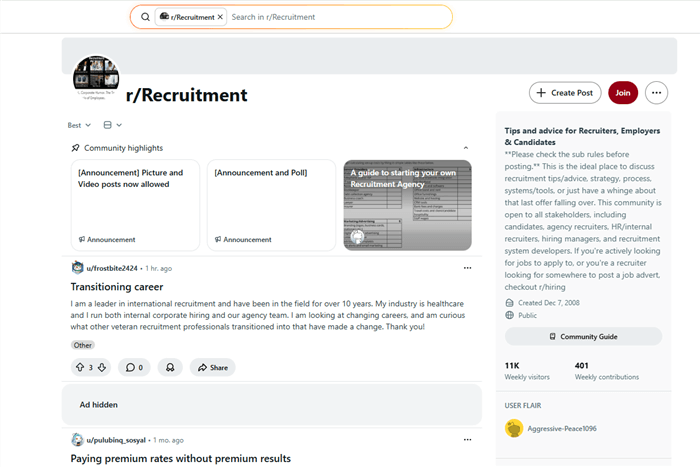
To make this guide truly “High-Converting,” we analyzed hundreds of posts from r/recruitment and r/resumes. Here is what the people who actually hire are saying:
1. The “First Person” Rule
A recurring theme on Reddit is the hatred for “The Third Person Summary.”
“When I see ‘John is an expert in…’ it feels like a bot wrote it or the person is stuck in 2005. LinkedIn is a social network, not a museum. Write like a human.” —Comment from r/Recruitment
2. The Keyword Stuffing Trap
Recruiters warn against “Keyword Clouds” at the bottom of a summary.
“If I see a block of 50 keywords at the bottom of your About section, I know you’re trying to ‘game’ me. Instead, weave those keywords naturally into your achievements.”
3. The “Non-Work” Value
Adding a single line about a hobby (e.g., “Marathon runner” or “Bakery owner on weekends”) often acts as a “Pattern Break” that makes you memorable to an exhausted recruiter.
Search Visibility Tips: The Keyword Map for Your Profile
Where should you actually put your keywords? It’s not just the summary.
| Profile Section | Search Visibility Weight | Strategy |
| Headline | Very High | Primary Job Title + 2 Core Skills. |
| Experience Title | Very High | Even if your internal title was “Level 2 Associate,” rename it to “Senior Software Engineer” (if accurate) for Search Visibility. |
| About Section | Medium-High | Use variations of your primary keywords (e.g., “Project Management,” “PMP,” “Agile Lead”). |
| Skills Section | High | Max out all 50 skills. This is the primary filter for LinkedIn Recruiter. |
How JobRight Helps You Validate What Converts
Writing a high-converting LinkedIn headline and summary is only half the equation. The other half is validating whether your positioning actually aligns with live market demand.
This is where JobRight AI fits naturally into the optimization workflow.
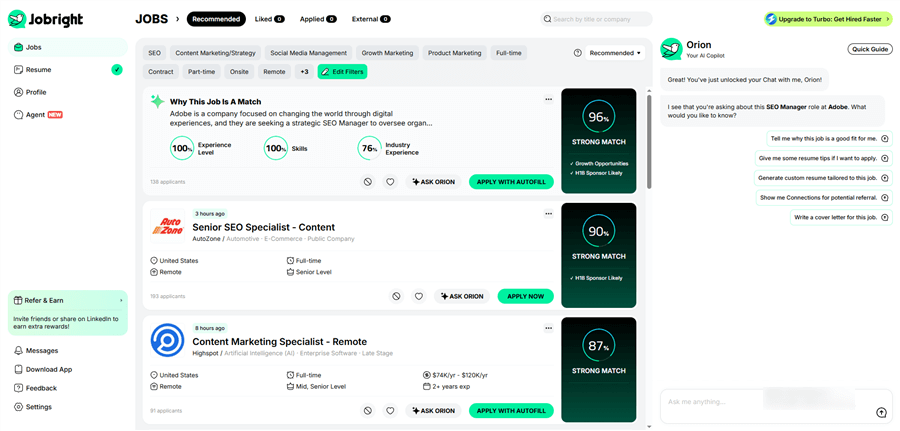
JobRight is an AI-powered career platform designed to help candidates bridge the gap between profile writing and real hiring outcomes. Instead of relying on guesswork, it analyzes live job data and recruiter preferences to show how well your profile signals match what employers are actively searching for.
Key ways JobRight supports LinkedIn optimization:
- AI Job Matching: Recommends roles based on skills, experience, and career trajectory — not just keyword overlap.
- Headline & Summary Validation: Identifies high-impact keywords, skills, and metrics commonly found in top-performing profiles within your target role.
- Resume & ATS Alignment: Helps translate your LinkedIn positioning into resume language optimized for automated screening systems.
Used alongside LinkedIn analytics, JobRight allows you to move from “this sounds good” to “this converts in the real market.”It’s not a replacement for strong writing — it’s a way to pressure-test and refine it.
Conclusion: Don’t Just Write, Test.
A high-converting LinkedIn headline and summary are not written once — they are refined over time. Start with proven frameworks. Let your profile run for 7–10 days. Then use real signals to guide your next move:
- Rising search appearances but low views? Your headline is searchable but not compelling.
- Views without DMs or connection requests? Your summary isn’t converting interest into action.
In 2026, the strongest profiles are built through continuous iteration, informed by both LinkedIn analytics and real job market feedback.
Treat your profile as a living asset — test it, measure it, and adjust it as your career goals and market demand evolve.
Frequently Asked Questions About LinkedIn Optimization
To help you finalize your profile makeover, here are the most common questions job seekers and professionals ask in 2026.
1. What is the character limit for the LinkedIn Headline and Summary in 2026?
- LinkedIn Headline: You have up to 220 characters. However, remember that on mobile, only the first 40–60 characters usually appear in the feed, so front-load your most important keywords.
- LinkedIn Summary (About): You have a maximum of 2,600 characters. While you have plenty of space, the most impactful summaries are typically between 1,000 and 1,500 characters.
2. Should I write my LinkedIn summary in the first or third person?
In 2026, the first person (“I am…”) is the gold standard. LinkedIn is a social networking platform, not a static encyclopedia. Writing in the third person (“John is a professional…”) creates a “corporate robot” feel that can distance you from recruiters. Use “I” to make your story more personal and approachable.
3. How much of my summary is visible before the “See More” button?
On both desktop and mobile, LinkedIn typically truncates your summary after the first 250 to 300 characters (roughly 3 lines). This is why your “Hook” is the most critical part of your profile. If those first three lines don’t grab attention or state your value, most users will never read the rest.
4. Should I include “Seeking Opportunities” or “Actively Hiring” in my headline?
Generally, no. Recruiters rarely use “seeking opportunities” as a search term. Instead, they search for titles like “Data Scientist” or “Project Manager.” Use your headline for keywords that describe your skills. To show you are looking for work, use LinkedIn’s official “Open to Work” photo frame and privacy settings, which are indexed specifically for recruiter tools.
5. How often should I update my headline and summary?
You should treat your profile as a “living document.” An update every 3 to 6 months is ideal. In 2026, industry trends and keyword demands shift quickly. If you’ve recently completed a major project, learned a new tool (like a specific AI framework), or achieved a new metric, update your headline immediately to stay relevant in search results.
6. Do hashtags work in my LinkedIn Summary or Headline?
Hashtags do not help your profile show up in LinkedIn’s internal “People” search. They are primarily used for Content Discovery in posts. Avoid using them in your headline or summary, as they can look like “keyword stuffing” and clutter your professional branding. Stick to plain-text keywords for Search Visibility.