
IT Remote Jobs: Roles, Skills & Where to Start
Table of Contents
If you’re looking for a shortcut to landing IT work from home jobs, this is it. No fluff, just the framework. I’m Dora, and I’ve broken down the massive world of remote IT into four actionable lanes: Support, Infrastructure, Data, and Software. Most candidates fail because their resumes are too broad for an ATS to parse. This guide fixes that. We’ll cover the exact tools employers screen for—like Okta, Jira, and AWS—and how to quantify your impact so you look like a low-risk, high-ROI hire. Whether you are searching for entry-level IT remote jobs or specialized engineering roles, the next ten minutes will give you a concrete checklist to move your application to the top of the pile.
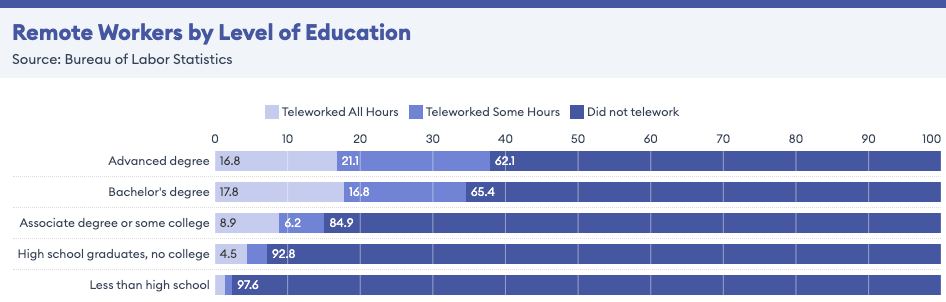
Industry research shows that remote work has rapidly expanded across technology roles, with millions of professionals now working remotely or in hybrid environments (remote work statistics and trends). Understanding how remote IT roles function in practice can help you target opportunities more strategically.
What Counts as an IT Remote Job?
“IT” is broad. Some roles are closer to customer help. Others are closer to engineering. When people say remote information technology jobs, they might mean any of these. If you’re new to the concept, a useful reference is this explanation of what a remote job actually means and how companies structure remote roles.
Support, infrastructure, data, and software paths
In practice, I group IT remote jobs into four lanes:
- Support (end-user + systems support): fixing access, devices, SaaS tools, tickets, permissions.
- Infrastructure (cloud + network + systems): keeping environments stable, AWS/Azure, Linux/Windows, networking, monitoring.
- Data (analytics + BI + data ops): dashboards, SQL, pipeline support, data quality checks.
- Software (internal tools + automation): scripting, integrations, platform work, DevOps adjacent tasks.
If you’re applying to IT work from home jobs, you need to pick a lane. Otherwise your resume reads like “I can do anything,” which ATS parses as “no clear match.” Keyword match matters.
Which IT functions go remote most easily
Remote-friendly IT work usually has two traits:
- Work is ticket-based or project-based. Clear inputs/outputs. Easy to measure metrics.
- No physical dependency. If the job needs hands on hardware daily, it won’t stay remote.
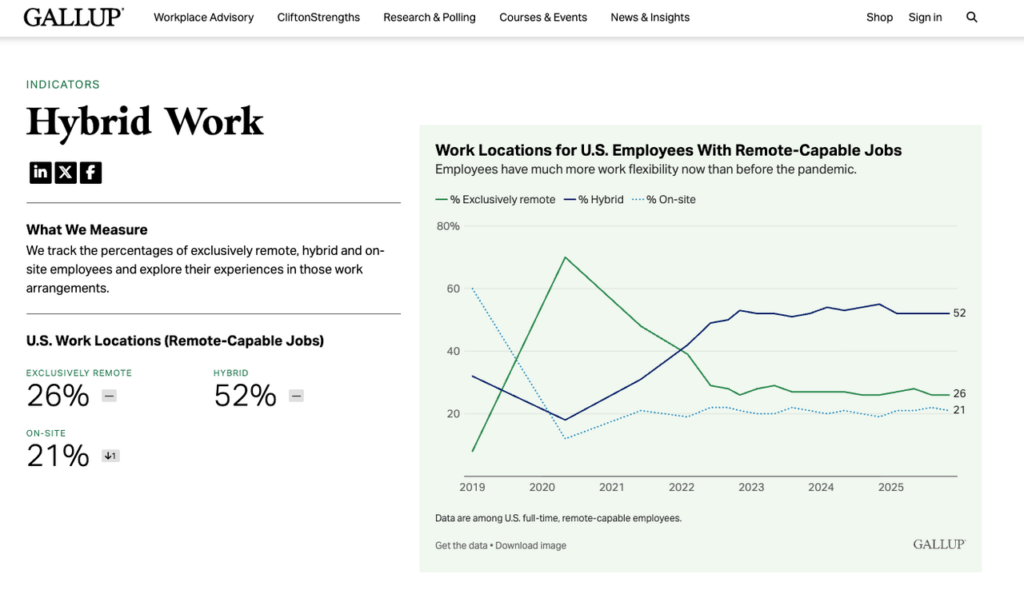
That’s why remote tech support jobs, security monitoring, cloud ops, and analyst roles often go remote faster than “desktop support in an office.” Hybrid is common for hardware-heavy teams. Surveys tracking hybrid and remote workplace trends show that technology roles remain among the most likely to support long-term remote work models.
The Main Types of IT Remote Jobs
When I review job listings with clients, I’m not just reading titles. I’m scanning the work units inside the description: alerts, tickets, audits, deployments, dashboards. That tells you whether you can do it from home.
Tech support, security, and analyst roles
Common remote IT jobs that show up daily:
- IT Support Specialist / Help Desk (remote): troubleshooting, account issues, device setup guidance, SSO/MFA resets. Strong fit for people who can communicate clearly.
- Customer Support Engineer (more technical): similar to support, but closer to product logs, APIs, and bug reproduction.
- SOC Analyst (Tier 1): monitoring alerts, triage, escalation, basic incident response steps.
- GRC / Compliance Analyst: evidence collection, policy mapping, audit support (surprisingly remote-friendly).
- Systems/Business/Data Analyst (IT side): SQL, reporting, workflow analysis, Jira/Confluence hygiene.
Many career guides highlighting top remote IT and technology jobs also show that support, analyst, and cloud operations roles are among the most consistently remote-friendly.
A quick note for international job seekers: these roles exist remotely, but not all companies can employ you in the US without sponsorship. Don’t assume “remote” means “anywhere.” It often means “remote in the US.”
Engineering and more specialized paths
These are also remote-friendly, but the bar is higher:
- Cloud/DevOps Engineer: CI/CD, Terraform, observability, incident response.
- Site Reliability Engineer (SRE): reliability metrics, automation, on-call maturity.
- Security Engineer: detections, EDR tuning, threat modeling.
- Data Engineer / Analytics Engineer: pipelines, dbt, warehouse modeling.
Recruiters won’t tell you this, but… titles can be inflated. A “DevOps Engineer” role might be 70% support. Read the actual tasks, then align your value prop to them.
What Employers Usually Look For
Remote hiring isn’t only about skills. It’s about risk. Employers ask: “Will this person unblock themselves? Will they communicate early? Will they keep systems safe?”
Tools, troubleshooting, and communication
Across most remote IT jobs, I see the same core requirements:
- Ticketing + documentation: Jira, ServiceNow, Zendesk, Confluence, Notion.
- Identity and access basics: Okta, Azure AD, SSO, MFA.
- OS + networking fundamentals: DNS, VPNs, TCP/IP basics, logs.
- Remote collaboration: Slack, Zoom, clear written updates.
Research in remote collaboration and productivity also shows that communication clarity and documentation practices significantly impact distributed team performance (peer-reviewed study on remote work productivity and collaboration).
And yes, communication is a technical skill here. In remote teams, a vague message like “It’s not working” is useless. A strong message includes: what changed, error text, screenshots/log snippet, and what you already tried.
Why proof of practical skills matters
If your resume says “troubleshooting,” ATS parsing can’t score that without context. You need proof. Quantify it.
Examples I like (because they show metrics and ROI):
- “Resolved 25–35 tickets/week with a 92% CSAT: improved first response time by 18%.”
- “Built a PowerShell script that cut laptop setup time from 90 min to 35 min.”
- “Created a runbook that reduced repeat incidents by 15% (based on monthly incident metrics).”
Stop guessing. Let’s look at the data: if your conversion rate from application → interview is under ~2–3%, it’s usually an alignment/keyword match problem, not “you’re not qualified.”
Entry-Level vs Experienced IT Remote Paths
People ask me if entry-level IT remote jobs are “real.” They’re real, but they’re competitive because everyone wants work-from-home.
What beginners can target first
If you’re early career, your fastest path is usually:
- Remote help desk / IT support (especially for SaaS companies)
- Customer support engineer (junior) if you can read logs and write basic SQL
- Junior IT analyst if you can build dashboards and explain metrics
Many career guides discussing IT jobs you can do from home show that support, cybersecurity monitoring, and analytics roles are often the most accessible starting points.
For candidates exploring analytics specifically, resources explaining entry-level remote data analyst roles or broader guides on data analyst job trends in 2026 can provide insight into typical skill requirements and hiring expectations.
The trick: don’t pitch yourself as “entry-level.” Pitch a specific value prop.
Example: “I reduce ticket backlog by writing clearer runbooks and automating repetitive fixes.” That’s leverage.
If you need visa sponsorship, be extra precise. Many companies won’t sponsor for junior support roles. Use sponsorship databases and confirm on the employer site before investing hours.
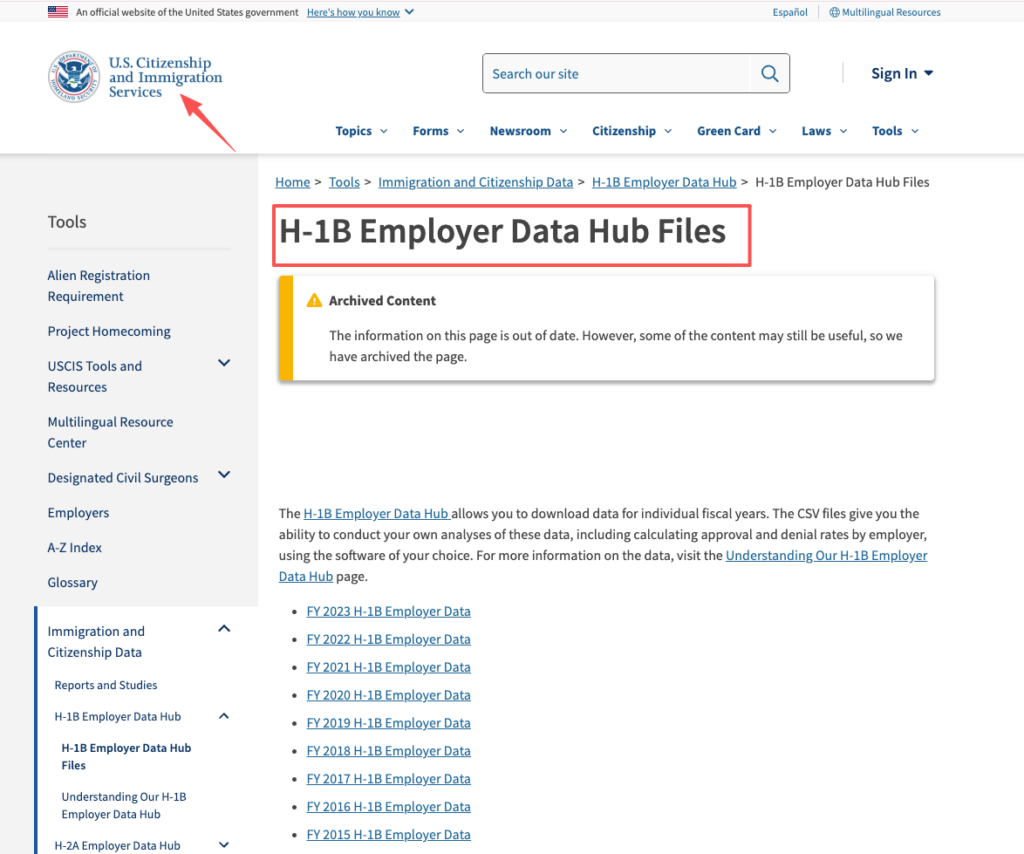
Helpful reference: datasets from the USCIS H-1B employer data hub can help you see which companies historically sponsor foreign workers.
Which paths need stronger technical depth
Some remote IT jobs look entry-level but aren’t:
- Cloud/DevOps: you’ll be expected to ship automation safely.
- Security (beyond SOC Tier 1): detection engineering and incident handling need reps.
- Infra/SRE: on-call work demands calm troubleshooting under pressure.
If you’re pivoting into these, build proof outside your job: home lab, cloud projects, GitHub, write-ups.
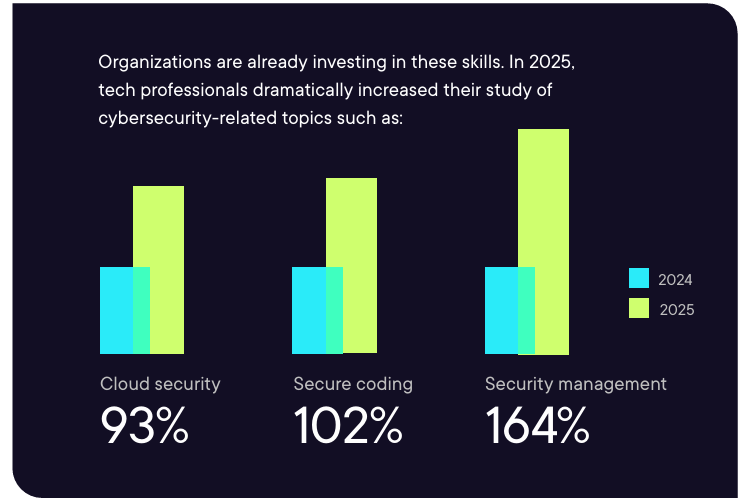
Industry reports tracking the most in-demand tech skills for the coming years consistently show cloud infrastructure, cybersecurity, and automation among the fastest-growing hiring areas. Those interested in security specifically can also explore guides to entry-level remote cybersecurity jobs.
Even better, mirror a real job description and create a “mini portfolio” that matches the keywords the ATS is scanning for (parsing loves exact tool names).
Where to Find Better-Fit IT Remote Listings
Most people search “remote IT jobs,” click Easy Apply, and repeat. That’s how you end up invisible.
How to avoid low-fit applications and compare live roles
My short checklist for finding better-fit it remote jobs (and avoiding wasted applications):
- Start with role-specific searches. Don’t search “IT remote.” Search “Okta admin remote,” “SOC analyst remote,” “ServiceNow remote,” “AWS operations remote.” That improves keyword match.
- Use filters that reflect reality. “Remote (US)” is different from “Remote (Anywhere).” If you need sponsorship, add that step early.
- Cross-check employer claims. If a listing is vague, go to the company careers page and confirm location and work authorization language. For a practical example, analyzing a well-structured live IT remote job listing can help you spot the exact tools and metric-driven requirements employers actually want.
- Track your funnel metrics. Applications sent → recruiter screens → interviews. If recruiter screens are near zero, fix ATS optimization first.
Modern hiring pipelines increasingly rely on automated screening tools, and research into AI adoption in recruitment and talent acquisition shows that many employers now use AI-assisted systems to filter applications before human review.
Places I consistently see higher-signal listings:
- LinkedIn Jobs (best volume, but noisy)

- Wellfound (AngelList Talent) (startups: read requirements carefully)
- Remote.co and We Work Remotely (curated boards)
- For visa planning: the USCIS page on the H-1B program helps you understand timelines and constraints
And one more tactic that beats the black hole: build an insider connection. Not “cold DM me a referral?” Instead: ask a precise question about their stack or team KPIs. You’re trying to create alignment, not awkward networking.
Final Take
You don’t need more applications. You need fewer, better ones, with cleaner alignment and stronger proof.
Who IT remote jobs suit best
IT remote jobs fit you best if you:
- like structured problem-solving (tickets, incidents, root causes)
- can write clear updates without over-explaining
- can quantify your impact with metrics
- stay calm when systems break (because they will)
If you want “remote” because you hate people, support roles will punish you. If you want remote because you focus better alone and communicate well in writing, you’ll thrive.
What to do before you apply
Do these three things first:
- Pick one lane (support, infra, data, or software) for the next 30 days.
- Tune your resume for ATS parsing: mirror the job’s tool names, show keyword match, and add measurable outcomes.
- Bring proof: a small portfolio, a runbook sample, a ticket metrics story, or a project that shows ROI.
Recruiters won’t tell you this, but… the resume that wins is usually the one that makes the hiring decision feel low-risk. If you do that, the application black hole starts to shrink.
You have the IT framework; now you need the right engine to power your search. Start exploring Jobright.ai today to access 24/7 guidance from Orion, your AI career scout, and get early warnings on the latest remote IT openings before they get crowded.
Frequently Asked Questions About IT Remote Jobs
What counts as IT remote jobs, and what types of work are included?
IT remote jobs cover more than one job title. Most fall into four lanes: Support (tickets, access, devices), Infrastructure (cloud, networks, systems), Data (SQL, BI, data ops), and Software (automation, integrations, DevOps-adjacent). Picking one lane improves keyword match and clarity for employers.
Which IT remote jobs are easiest to get hired for and stay fully remote?
Roles go remote most easily when work is ticket-based or project-based and doesn’t require daily hands-on hardware. That’s why remote tech support jobs, SOC Tier 1 monitoring, cloud operations, and analyst roles are commonly remote-friendly. Hardware-heavy desktop support often ends up hybrid instead.
Why am I not getting interviews for IT remote jobs after applying a lot?
Often it’s not “competition”—it’s misalignment: wrong lane, wrong keywords, or weak proof. ATS systems score specific tool and task matches, not vague claims like “troubleshooting.” If your application-to-interview rate is under ~2–3%, refine targeting, mirror tool names, and add measurable outcomes.
What do employers look for most in IT work from home jobs?
Hiring managers screen for reduced risk: strong troubleshooting, clear written communication, and safe execution. Common requirements include ticketing/documentation (ServiceNow, Jira, Zendesk, Confluence), identity basics (Okta, Azure AD, SSO/MFA), and fundamentals (DNS, VPN, TCP/IP). Proof with metrics matters.
Are entry-level IT remote jobs real, and what roles should beginners target?
Entry-level IT remote jobs are real, but competitive because demand is high. Beginners often land faster in remote help desk/IT support, junior customer support engineer roles (logs, basic SQL), or junior IT analyst work (dashboards, reporting). The key is a specific value proposition, not “entry-level” branding.