
The Ultimate Guide to Optimizing Your LinkedIn Profile (2026)
Table of Contents
Key Takeaways:
In 2026, LinkedIn profiles are no longer resumes — they are AI-ranked discovery assets. Recruiters rely on LinkedIn’s AI Hiring Assistant to filter, summarize, and prioritize candidates before any human review. To be visible, your profile must be verified, data-driven, and semantically optimized for both machine logic and human trust.
This guide shows you how to:
- Align your profile with AI-driven discovery logic (semantic search, predictive matching, recency signals)
- Use verification, standardized titles, metrics, and skills to avoid being filtered out
- Convert AI visibility into human trust through visual branding, proof of impact, and featured evidence
- Engineer your profile to consistently appear in “Top Fit” shortlists, even without active applications
In 2026, the professional landscape has undergone a tectonic shift. We are no longer in the era of “online resumes.” We are in the era of AI-driven talent discovery.
Your LinkedIn profile is no longer just a gallery for humans to browse; it is a dynamic data asset that feeds directly into LinkedIn’s AI Hiring Assistant. If your profile isn’t optimized for both human psychology and machine logic, you are effectively invisible to the recruiters who matter most.
By analyzing the underlying mechanics of modern hiring, this guide decodes what makes a profile truly “discoverable” in 2026. From your initial setup to advanced Discovery Engineering and Algorithmic Alignment, here is everything you need to command the attention of both AI agents and human decision-makers.
The New Gatekeeper: Understanding LinkedIn’s AI Hiring Assistant
Before you change a single word on your profile, you must understand who (or what) is reading it. In late 2025, LinkedIn fully integrated its AI Hiring Assistant into the Recruiter platform.
What is the AI Hiring Assistant?
The AI Hiring Assistant is a sophisticated agent that performs the “first pass” for recruiters. Instead of a human manually scrolling through thousands of search results, the AI does the following:
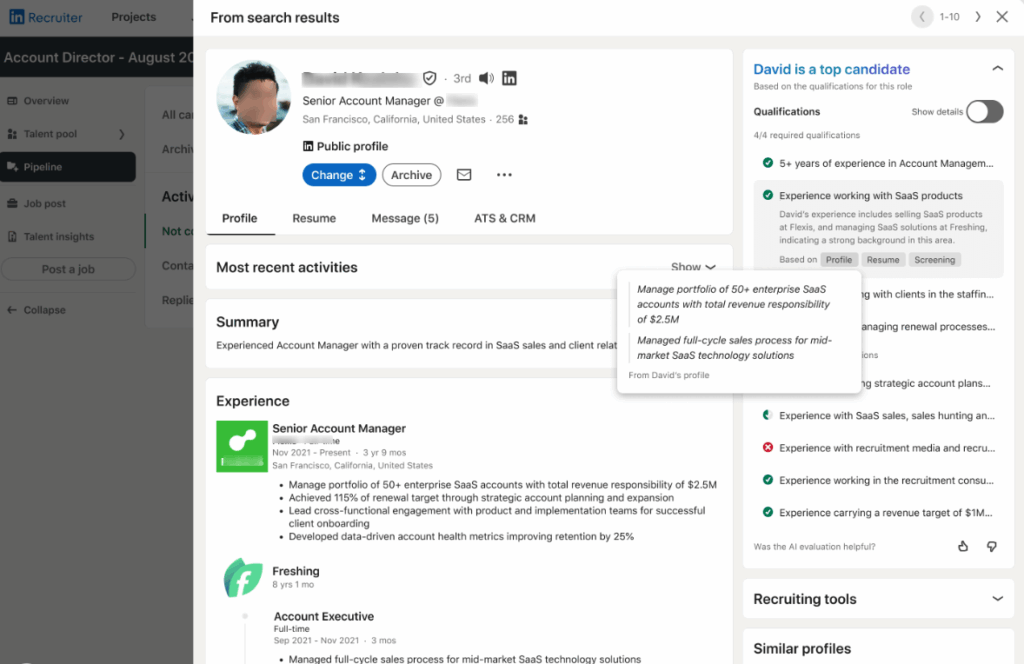
- Semantic Shortlisting: It groups candidates into “Top Fit,” “Maybe,” and “Not a Fit” based on natural language descriptions provided by the hiring manager.
- Summarization: It reads your entire profile—including your “About” section and “Experience” bullets—and provides the recruiter with a 3-sentence summary of your “Value Prop.”
- Predictive Matching: It doesn’t just look for your past job titles; it analyzes the trajectory of your skills to predict if you can handle a more senior role.
LinkedIn’s internal telemetry indicates that AI-assisted search has increased InMail acceptance rates by 18%, according to the LinkedIn Talent Solutions Report. Why? Because the AI is better at finding “hidden talent” that doesn’t just have the right keywords, but the right context.
Foundation: LinkedIn Profile for Beginners
If you are just starting your journey on LinkedIn or haven’t touched your profile in years, you must begin with the structural basics. In the world of Discovery Engineering, a house built on sand cannot support a roof designed for Algorithmic Alignment.
Before you can appeal to the advanced AI Hiring Assistant, you must ensure your profile meets the fundamental standards of credibility and structure.
1. Account Setup & The “Metadata of Your Name”
Your first step isn’t just about aesthetics; it’s about making yourself indexable. When you first create a profile, LinkedIn assigns you a generic URL cluttered with random numbers and letters.
The Action: Claim a custom URL (e.g., linkedin.com/in/janesmith).
According to Google’s latest indexing guidelines, personalized URLs act as a primary signal for name-based searches. By cleaning your URL, you improve your Discovery Engineering across the broader web, ensuring your LinkedIn profile—your most important professional asset—ranks at the top when someone searches for your name.
2. The Verification Revolution: Securing Your “Blue Badge”
With the proliferation of AI-generated “ghost” profiles and deepfake credentials, identity verification has become the ultimate currency of trust on LinkedIn.
By using LinkedIn’s verified partners (such as Persona or CLEAR) to validate a government-issued ID, profiles earn the Blue Verification Badge—an important signal within the AI Hiring Assistant’s ranking engine. Verified profiles receive higher internal trust scores, increasing their likelihood of appearing in recruiter shortlists.
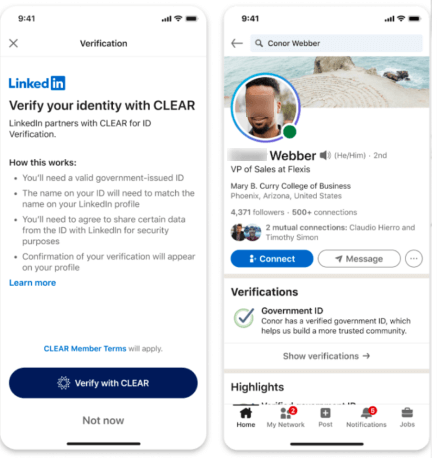
According to LinkedIn’s official reporting, verified profiles see up to 30% more messages and overall engagement compared to unverified profiles.
Recruiter behavior reflects this shift. To maintain high-quality talent pools, many recruiters now enable the “Verified Only” filter during searches. Without this badge, candidates risk being filtered out before a human ever sees their profile.
3. Strategic Privacy: Mastering “Stealth Mode”
In 2026, job hunting is a strategic operation. For those looking for new opportunities while currently employed, LinkedIn’s privacy ecosystem has become more sophisticated, allowing for “Algorithmic Signaling” without compromising your current position.
Navigate to Settings > Data Privacy > Job Seeking Preferences.
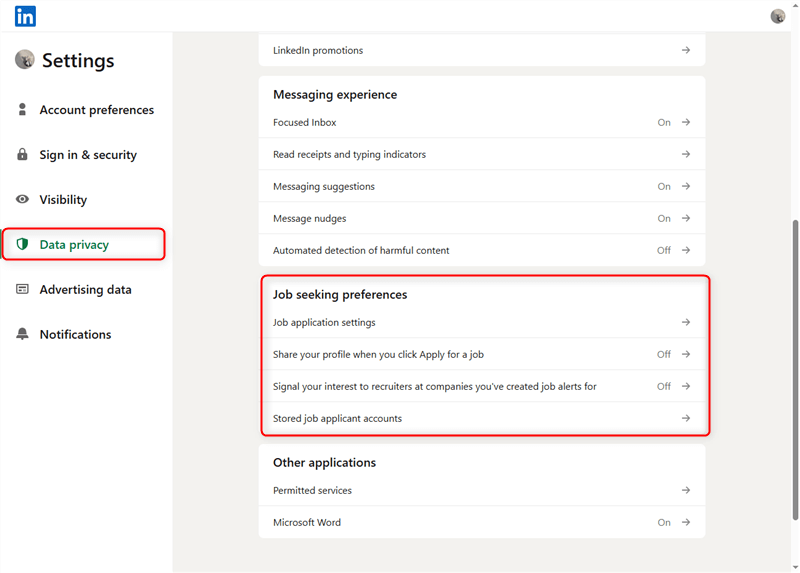
Enable the “Open to Work” status but restrict visibility to “Recruiters Only.”
LinkedIn’s updated privacy filters are now robust enough to cross-reference company IDs and subsidiary data, effectively hiding your “looking” status from your current employer’s internal HR team while broadcasting your availability to the rest of the market. This creates a powerful signal for the AI Hiring Assistant to prioritize you in external talent searches.
Visual Branding: LinkedIn Profile Photo Tips & Banners
Humans are visual creatures. Even if the AI puts you at the top of the list, a poor visual brand will kill your conversion rate at the human review stage.
1. The Profile Photo: The 60% Rule
Your profile photo is your digital handshake. In 2026, the “Uncanny Valley” (overly-perfect AI headshots) is a turn-off.
- Framing: Your face should take up roughly 60% of the circle.
- Lighting: Natural light is superior to studio lighting for building warmth and trust.
- Expression: AI visual analysis shows that a “Duchenne smile” (one that reaches the eyes) correlates with higher “Approachable Leadership” scores in recruiter dashboards.
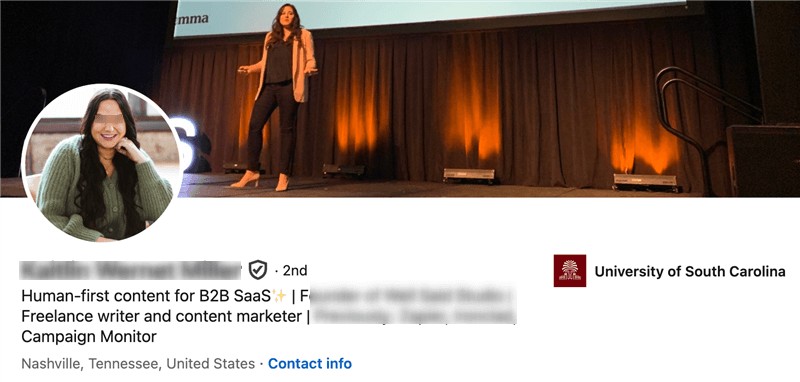
2. The Banner Image: Your Professional Billboard
The gray default background is a wasted opportunity.
- For Individual Contributors: Use a banner that shows you “in action”—presenting at a meeting, a clean workspace, or a relevant industry landscape.
- For Leaders: Use a high-quality quote or a visual representation of your core mission (e.g., “Building the future of FinTech”).
Profiles with a professional photo receive 21x more views and 9x more connection requests than those without.
Copywriting for Success: Headlines & “About”
If your profile foundation is the structure of the house, copywriting is the interior design and the smart system running beneath it. This is the semantic layer of your LinkedIn profile—the area where the AI Hiring Assistant spends the most processing time and where human recruiters decide whether to keep reading.
In 2026, profile writing is no longer about listing responsibilities. It is about contextual anchoring: supplying the AI with precise signals to classify your expertise, while simultaneously telling a coherent story that resonates with human decision-makers.
1. The Headline Formula: The Apex of Algorithmic Alignment
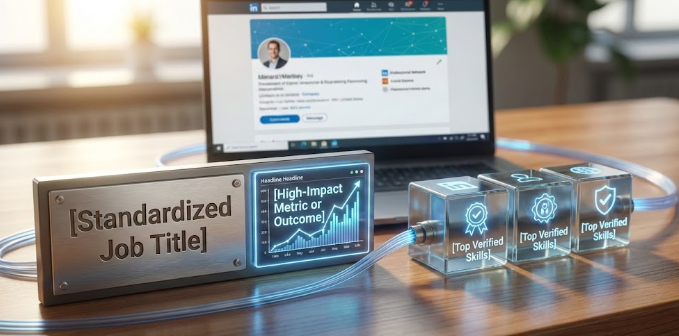
The most important element is your headline. It is the primary field indexed by LinkedIn’s AI and the first text recruiters see in search results. A standardized job title is now essential for machine indexing, but differentiation comes from pairing that title with proof of impact and verified skills.
A high-performing headline follows this structure:
[Standardized Job Title] | [High-Impact Metric or Outcome] | [Top Verified Skills]
Leading with a standardized title ensures the algorithm places you correctly within LinkedIn’s professional taxonomy. Including a metric demonstrates real-world impact, while verified skills act as secondary discovery triggers that expand your search visibility.
This approach is strongly reinforced by practitioner feedback. In a widely upvoted discussion within the accounting community, such as r/Accounting, recruiters emphasize that credentials must be explicitly stated in the headline, not implied. One recruiter noted that CPA eligibility or exam completion is often the primary filter for entry- and mid-level accounting roles, and profiles that omit it may never surface in search results.
2. The “About” Section: From Static Summary to Strategic Narrative
The “About” section has also evolved. It is no longer a static summary, but a context engine that connects where you’ve been, what you’re doing now, and where you’re heading next.
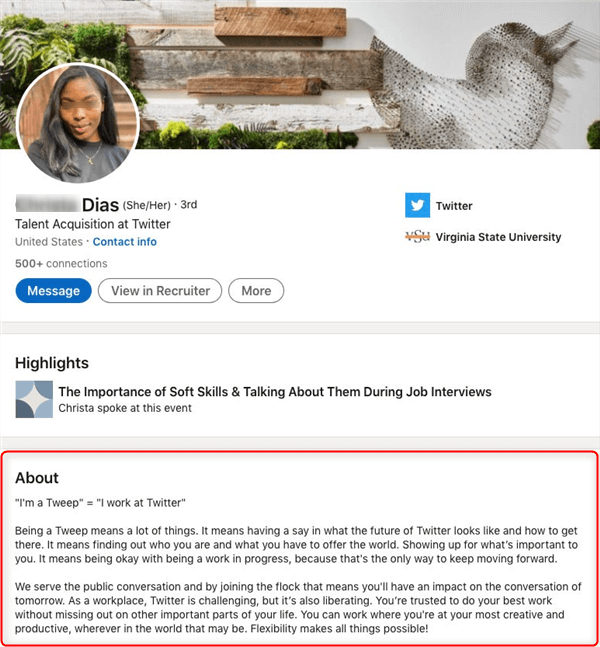
Only the first two lines are visible on mobile and in AI-generated candidate summaries, making them critical. These opening lines should clearly state your highest-value contribution. Vague introductions such as “results-oriented professional with X years of experience” produce equally vague AI summaries and fail to differentiate you.
A strong “About” section follows a simple narrative arc. It briefly establishes your foundational experience, then focuses on the complex problems you currently solve, naming the tools, systems, or methodologies you use. Finally, it articulates your professional direction or mission—an explicitly human signal that helps distinguish you from AI-generated profiles.
This storytelling approach mirrors advice frequently shared by career professionals on r/careeradvice on Reddit, where users consistently highlight that the most effective LinkedIn profiles present a joined-up story rather than disconnected achievements.
To reinforce discoverability, the end of your “About” section should include a concise skills or tools cluster. This allows the AI to associate your profile with related roles and niche searches through semantic similarity, even when those keywords don’t fit naturally into the narrative.
In 2026, strong LinkedIn copywriting is not about sounding impressive—it’s about being understood, classified, and trusted by both machines and humans.
Further Reading: Best LinkedIn Profile Examples To Learn From >
Proof of Impact: Experience & The Featured Section
In the 2026 professional ecosystem, “responsibilities” have become invisible. The AI Hiring Assistant is programmed to ignore passive descriptions of duties and instead seeks out high-confidence impact signals. This section is where you provide the raw data to prove your value and the visual evidence to secure human trust.
1. Data-Driven Experience: Beyond the Bullet Point
The Experience section is the primary source of truth for Algorithmic Alignment. In 2026, the machine logic doesn’t just look for what you did, but the scale and context of your success.
The “Action + Context + Result” Model: Every bullet point must be an indexed achievement.
AI models now analyze the “complexity” of your results. Mentioning the specific tools (e.g., Python, SAP, or AI-automation platforms) provides the Semantic Context the machine needs to rank you.
If a result isn’t quantified, it effectively didn’t happen in the eyes of the AI.
- Ineffective: “Managed team budgets and reduced costs.”
- Optimized: “Optimized a $2.5M annual operational budget using predictive AI modeling, resulting in a 14% year-over-year cost reduction without impacting headcount.”
The Recruiter Reality: According to LinkedIn Talent Solutions, profiles that use data to describe their accomplishments see a 27% higher “Match Confidence” score from the AI Hiring Assistant, leading to prioritized placement in recruiter dashboards.
2. The LinkedIn Featured Section: Your “Trust Funnel”
If the Experience section is for the bots, the Featured Section is for the humans. By 2026, the “Featured” area has evolved into a Discovery Hub—a multi-modal gallery that provides the “social proof” required to move you from a “Maybe” to an “Interview.”
High-Conversion Content to Feature:
- Video Cover Story (The Communication Proof): A 30-60 second “elevator pitch” video. In 2026, recruiters use this to gauge cultural fit and communication skills. Pro Tip: Ensure your video transcript includes your core keywords, as the AI now indexes audio-to-text data for search.
- Artifacts of Authority: Link to high-authority guest posts or industry features (e.g., The USA Leaders or LeadGen App Blog). This builds “E-E-A-T” (Experience, Expertise, Authoritativeness, and Trustworthiness) for your personal brand.
- Deep-Dive PDF Case Studies: Uploading a “Problem-Action-Result” slide deck allows a recruiter to see your strategic thinking process in seconds.
- Interactive Newsletters: If you write a professional newsletter on LinkedIn, pin the most popular edition here to showcase your thought leadership.
3. The “Evidence” Paradox: Verification vs. Claims
As one Reddit user noted in a trending r/careeradvice debate: “Anyone can write that they saved a company a million dollars, but the Featured section is where you show the receipt.” In 2026, the AI Hiring Assistant performs Cross-Reference Validation. If your Featured section includes a PDF or link that corroborates the data in your Experience section, your “Authenticity Score” increases. This synergy is the heart of Discovery Engineering—ensuring that every part of your profile works together to tell a singular, verifiable, and high-impact story.
Vertical Focus: LinkedIn Profile for Accountants
To illustrate how to apply these rules, let’s look at a specific case study for Accountants.
Accountants often struggle with LinkedIn because their work is confidential and “dry.” However, the 2026 market demands Technology-Enabled Accountants.
| Section | Optimization Strategy for Accountants |
| Headline | Senior Accountant (CPA) |
| About | Lead with your ability to act as a Strategic Business Partner, not just a “record keeper.” |
| Skills | Focus on Compliance (GAAP/IFRS) and Automation Tools. |
| Experience | Highlight Risk Mitigation and Cost Savings. Use hard numbers. |
From Discoverability to Opportunity: How JobRight Completes the AI Hiring Loop
Optimizing your LinkedIn profile ensures that you are discoverable by LinkedIn’s AI Hiring Assistant. But discoverability alone doesn’t guarantee interviews. In 2026, many candidates pair a high-performing LinkedIn profile with AI-driven job matching tools to turn visibility into real opportunities.
JobRight is one such platform designed to complement LinkedIn’s hiring ecosystem.
Unlike traditional job boards that rely on keyword search, JobRight uses AI to match candidates with roles based on skills, experience, and career trajectory. This reduces irrelevant applications and improves the likelihood of being a genuine “Top Fit.”
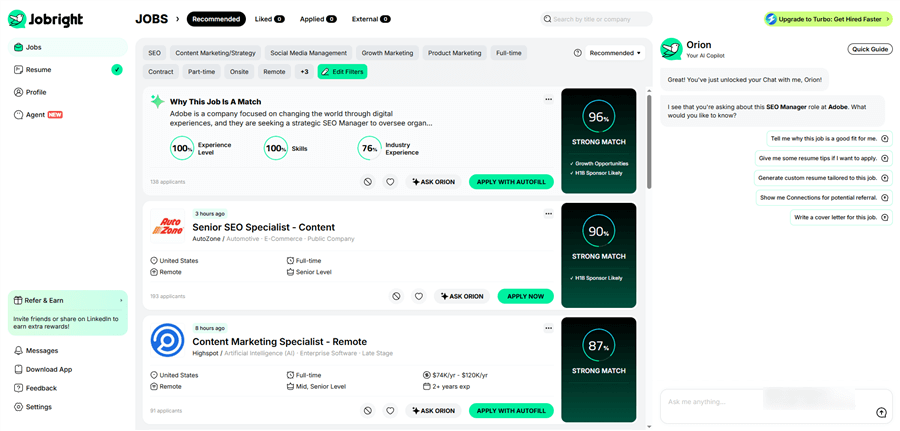
Key capabilities include:
- AI Job Matching: Personalized role recommendations aligned with both current experience and growth potential.
- Resume AI & ATS Alignment: Role-specific resume optimization to improve pass-through rates in automated screening systems.
- Connection & Referral Insights: Identification of potential internal contacts (alumni, shared networks) to increase referral chances.
- AI Career Copilot: Continuous job monitoring and guidance based on live market demand.
When combined with a well-optimized LinkedIn profile, JobRight helps create a simple but effective loop: LinkedIn maximizes AI visibility → JobRight converts that visibility into targeted applications and interviews.
Conclusion
In 2026, the most successful professionals move beyond applying for jobs to achieving permanent discoverability. By mastering Algorithmic Alignment, you turn LinkedIn’s AI Hiring Assistant into a 24/7 advocate that surfaces your profile to recruiters around the clock.
To further accelerate this process, many candidates now pair an optimized LinkedIn presence with AI-driven job matching tools like JobRight AI. By analyzing both your profile signals and live market demand, platforms like jobright.ai help connect algorithmically strong candidates with roles where they are genuinely a top fit — reducing noise and increasing interview probability.
Don’t leave your career trajectory to chance. By bridging invisible data gaps and aligning with both hiring algorithms and smart matching systems, you ensure your name consistently ranks at the top of every “Top Fit” list.
LinkedIn Profile FAQs
Q1: Is the LinkedIn Premium badge worth it in 2026?
A: Yes, primarily for the AI-powered insights. Premium now gives you a “Competitive Landscape” view, showing you exactly how your skills compare to other applicants for a specific role.
Q2: How many skills should I list?
A: Use all of them. In 2026, skills are no longer cosmetic—they are classification signals.
LinkedIn currently allows up to 100 skills, and there is no ranking penalty for using the full limit. The AI Hiring Assistant treats skills as semantic tags, grouping you into multiple professional clusters based on combinations of hard skills, tools, and domain knowledge.
This means your visibility increases non-linearly: one additional skill might place you into an entirely new search category. Prioritize a mix of:
- Core role-defining skills
- Tools and platforms (software, systems, frameworks)
- Adjacent or emerging skills relevant to your target roles
Leaving skill slots unused is essentially leaving discoverability on the table.
Q3: What is the biggest mistake beginners make?
A: Ignoring the “Recency” signal. If you haven’t posted or commented in 6 months, the algorithm assumes you are “passive” and will rank you lower than an active candidate with slightly fewer skills.
Q4: Does the LinkedIn AI read the text in my Featured Section PDFs?
A: Yes. In 2026, LinkedIn’s OCR (Optical Character Recognition) is highly advanced. The keywords inside your uploaded case studies and PDFs contribute to your overall search ranking.
Q5: How often should I update my profile?
A: At least once per quarter—more often if you’re actively exploring opportunities.
Even small updates trigger what recruiters often refer to as a “Recency Boost” in the AI Hiring Assistant dashboard. Profiles marked as recently updated are surfaced more prominently because they signal availability, relevance, and engagement with the job market.
Updates don’t need to be major. Adjusting a headline metric, adding a skill, refreshing the About section, or uploading a new Featured asset is often enough to flag your profile as “current” in the system.