
LinkedIn AI Job Matching: The Simple Guide to Getting Noticed (and Debunking the Myths)
Table of Contents
Have you ever found the ‘perfect’ job on LinkedIn, assessed your own qualifications and thought, ‘I’m a perfect match for this’, only to find that LinkedIn has ranked you as a ‘Top Applicant’ for an entirely different role that barely interests you? Or worse still, have you applied for dozens of roles where you meet every single requirement, yet never hear back?
If this sounds familiar, you aren’t alone. In 2026, job hunting feels less like a conversation and more like trying to solve an ever-changing puzzle. The ‘puzzle master’ is LinkedIn’s artificial intelligence.
But here’s the secret: LinkedIn’s AI isn’t trying to reject you. It’s actually trying to help you. The problem is that most job seekers communicate in “Human”, while the AI listens for “Data”.
In this guide, we will teach you how to bridge that gap. We’ll show you how the AI analyses your background, debunk myths that are wasting your time, and demonstrate how Jobright.ai can act as your personal translator, ensuring you get the credit you deserve.
Why Am I Being Ghosted? How LinkedIn AI Job Matching Really Works
Before we dive into the “how-to,” let’s talk about the “why.” Why does it feel like your resume is falling into a black hole?
The Librarian Analogy
Imagine LinkedIn as the world’s largest library. Every job seeker is a book, and every recruiter is a person looking for a very specific story. The AI is the Librarian.
When a recruiter says, “I need a Marketing Manager who knows how to use AI tools,” the Librarian doesn’t have time to read every single book cover-to-cover. Instead, it looks at the spine (your Job Title), the index (your Skills list), and the summary (your About section).
If your “book spine” says “Growth Specialist” but the recruiter asked for “Marketing Manager,” the Librarian might pass you over—even if you did the same work. The AI isn’t “mean”; it’s just literal.
The Frustration is Real
On communities like Reddit, users frequently vent about this. A common thread in r/LinkedIn involves users complaining that they are “overqualified” yet categorized as “not a match.”
The reality? You aren’t being rejected because you aren’t good enough. You are being “mis-filed” because your profile doesn’t have the specific signals the AI is looking for.
A Step-by-Step Guide to Improving Your LinkedIn AI Job Matching Score
You don’t need a degree in Data Science to win at LinkedIn. You just need to fix the “Core Four” areas of your profile.
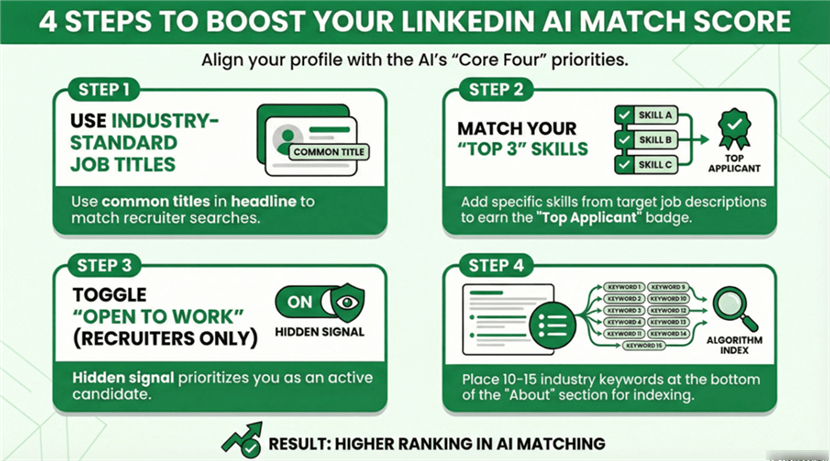
1. Job Title Alignment (The “Spine”)
This is the biggest mistake people make. Your company might have called you a “Digital Ninja” or a “Level 4 Coordinator,” but nobody is searching for those terms.
Look at the jobs you want. What is the most common title? Use that. If you are a “Customer Success Lead” but the industry standard is “Account Manager,” put the standard title in your headline.
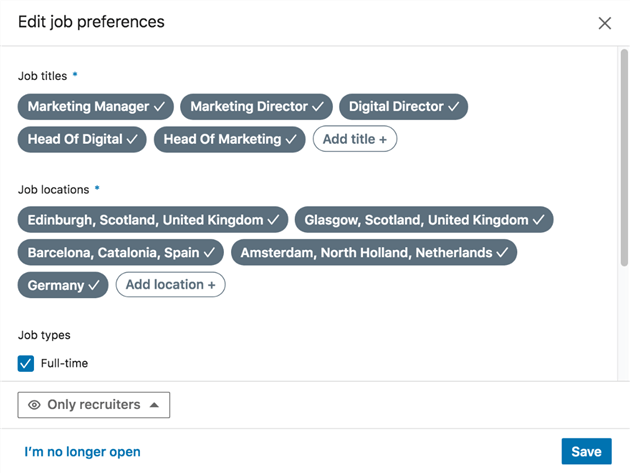
Pro Tip: You can use “standard” titles in your headline while keeping your “official” titles in your experience section. This satisfies the AI without lying about your history.
2. The “Top 3” Skills (The “Index”)
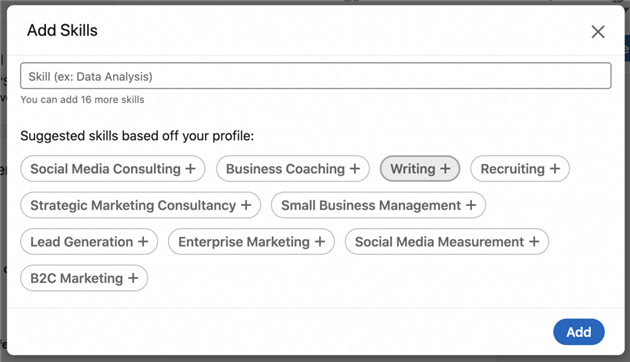
LinkedIn allows you to list up to 50 skills, but the AI pays the most attention to the ones you associate with your current and past roles.
The Matcher: When a company posts a job, they pick 10 “Desired Skills.” If you have 8 of those 10 on your profile, you get the “Top Applicant” badge.
Open a job description on LinkedIn. Scroll down to the “Skills” section. LinkedIn will literally tell you which skills you are missing. Add them to your profile immediately (if you actually have those skills, of course!).
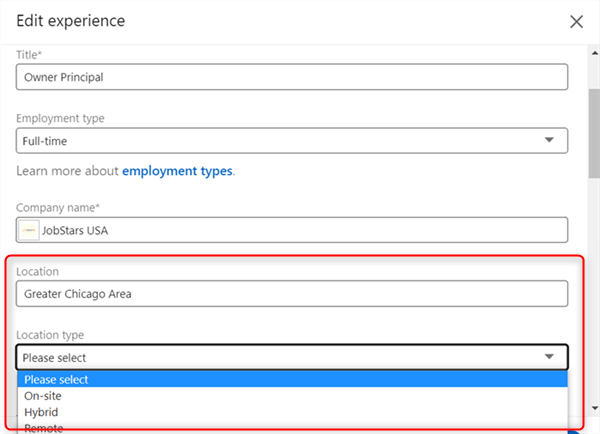
3. Location and “Intent” Toggles
The AI prioritizes people who are “available.”
The “Open to Work” Feature: You don’t have to put the green circle on your photo. You can set it to “Recruiters Only.” This is a massive signal to the AI. It tells the system, “Prioritize me in search results because I am likely to respond to a message.”
4. The “About” Section: The 80/20 Rule
Your “About” section should be 80% for humans (your story, your passion) and 20% for the AI (keywords).
How to do it: Write your bio normally. Then, at the very bottom, add a small section titled “Core Competencies” or “Specialties” and list 10–15 keywords related to your industry. This gives the AI the “data” it needs without making your profile look like a robot wrote it.
Debunking Common Myths About the LinkedIn Job Matching Algorithm
There is a lot of bad advice on the internet. Let’s clear the air and look at what actually matters in 2026.
Myth #1: “I need to repeat keywords 10 times to rank higher.”
The Truth: This is called “keyword stuffing,” and it died years ago. LinkedIn’s AI now uses Semantic Search.
If you list “Social Media Marketing,” the AI is smart enough to know you probably also know about “Content Strategy” and “Engagement Metrics.” Repeating the word “Marketing” fifty times won’t help you; in fact, it might make your profile look spammy to a human recruiter.
Myth #2: “The AI is a Gatekeeper designed to keep me out.”
The Truth: Actually, LinkedIn wants you to find a job. Why? Because when you get hired, LinkedIn looks like a successful platform, and they can charge companies more to post jobs.
The AI is a Matchmaker, not a guard. If you aren’t matching, it’s a communication error, not a conspiracy.
Myth #3: “I should copy and paste the Job Description into my Resume.”
The Truth:Don’t do this. Recruiters have AI tools too. If a recruiter sees that your resume is a 100% word-for-word match with the job description, they will know you used a bot to “cheat.”
A popular post on r/JobSearchTips pointed out that “perfect matches” often get extra scrutiny. Aim for an 80–90% match. It looks more human and more honest.
How LinkedIn AI Analyzes Your Background and Job Requirements
When you upload your resume or update your profile, LinkedIn’s AI does something called Background Mapping.
It doesn’t just look at where you worked; it looks at your career trajectory.
- Past: Where did you start?
- Present: What are you doing now?
- Future: Based on people like you, where are you likely to go next?
If you are trying to switch careers—for example, moving from teaching to Corporate Training—the AI might get confused. It sees “Teacher” and tries to match you with “School Principal” roles.
This is where Jobright.ai becomes your best friend. Jobright.ai looks at your “Teacher” background and helps you translate those skills into “Corporate Speak.” It tells the LinkedIn Librarian, “Hey, this person isn’t just a teacher; they are an expert in Curriculum Development and Stakeholder Management.”
How Jobright Helps You Master the LinkedIn AI Job Matching Process
You could spend hours trying to guess what the LinkedIn AI wants. Or, you could let Jobright do the heavy lifting for you.
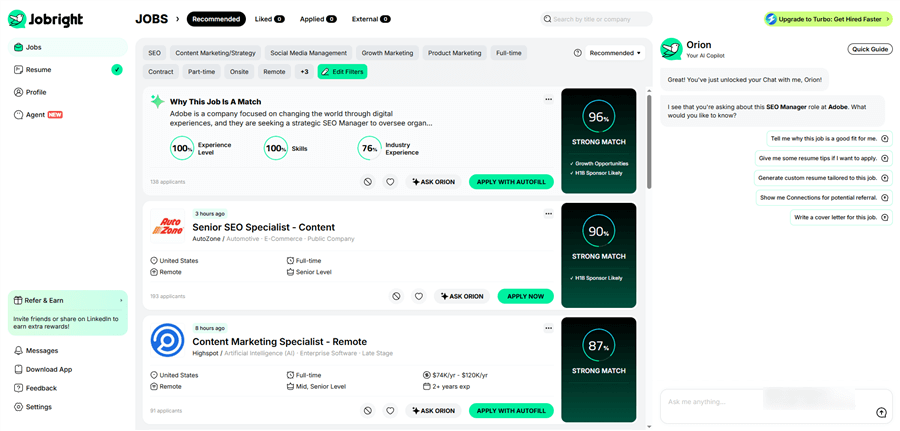
1. Get Your Instant “AI Match Score”
When you find a job you love, you shouldn’t have to wonder if you’re a good fit. With the Jobright AI Match tool, you can instantly see a percentage score (from 0 to 100%) that tells you exactly how well your profile matches the job description.
The Benefit: If your score is low, you know you need to make changes before you apply. If it’s high, you can hit “Apply” with total confidence.
2. See the “Recruiter’s View” of Your Profile
Have you ever wondered what a recruiter actually sees when they search for candidates? Jobright.ai acts like a mirror. It analyzes your resume and LinkedIn profile to show you the “gaps” you didn’t know you had.
The Benefit: It might find that while you have “Data Analysis” experience, the AI is looking for “SQL” specifically. By highlighting these invisible gaps, Jobright.ai helps you fix your profile so the LinkedIn Librarian can finally “file” you in the right folder.
3. Uncover “Hidden” Job Requirements
Sometimes, job descriptions are poorly written. A recruiter might forget to list a key skill in the text, even though they are using that skill to filter candidates in the background. Jobright.ai analyzes thousands of similar job postings to identify these “Hidden Requirements.”
The Benefit: By adding these missing pieces to your profile, you often jump to the top of the list, ahead of applicants who only included what was written in the basic job ad.
4. No More Keyword Guesswork: “Must-Haves” vs. “Nice-to-Haves”
Many job seekers make the mistake of cluttering their profiles with every keyword they can find. This actually confuses the AI. Jobright.ai tells you which keywords are “Must-Haves” (the ones that trigger the match) and which ones are just “Nice-to-Haves.”
The Benefit: You can keep your profile clean and readable for human recruiters while still satisfying the AI. You won’t waste valuable space on your profile with words that don’t help you get the job.
5. Tailor Your Background in Seconds
The [suspicious link removed] doesn’t just tell you what’s wrong; it tells you how to fix it. If you’re a 75% match, Jobright.ai will provide specific, actionable advice, such as: “You need to emphasize your ‘Project Management’ experience from your third job to reach a 95% match score.”
The Benefit: You save hours of manual editing. You get a customized roadmap for every single job application, ensuring you are always presenting the best possible version of yourself to the algorithm.
6. Real-Time Tracking and Optimization
The world of AI moves fast, and so does the job market. Jobright.ai keeps your search organized by tracking your matches and suggesting updates as job requirements evolve.
The Benefit: You stay ahead of the competition. While other job seekers are using outdated resumes, you are using a profile that is perfectly tuned for the 2026 hiring landscape.
What Real Users Say About LinkedIn AI Matching
We checked the latest discussions on Reddit and LinkedIn to see what real people are saying about AI matching right now.
The “PDF vs. Word” Debate
For years, people said, “Never use a PDF because the AI can’t read it!” In 2026, this is totally false. As discussed in r/Resume, modern AI can read PDFs perfectly. However, the community agrees: Keep it simple. Use a single-column layout. Avoid fancy graphics or charts inside your work history, as these can still “confuse” the AI’s ability to map your dates of employment.
The Power of “Skills Assessments”
Did you know LinkedIn has those short quizzes to “verify” your skills in things like Excel, Python, or Project Management?
According to users on r/LinkedInTips, having a “Verified” badge for a skill gives you a massive boost in the recruiter’s search view. It’s like having a “Certified” sticker on your book in the library—the Librarian (AI) trusts you more.
Conclusion: You Are More Than an Algorithm
At the end of the day, remember this: The AI is just a tool. It’s there to help a human recruiter find a human candidate.
By taking 15 minutes to align your job titles, update your top 3 skills, and use a tool like Jobright.ai to check your work, you are taking control of the process. You aren’t just “applying and praying”—you are strategically positioning yourself to be found.
Stop letting the “Black Box” of AI hold your career back. Start speaking the language of the algorithm, and let your true background shine through.
Frequently Asked Questions on LinkedIn AI Job Matching
To help you navigate the ever-changing landscape of AI-driven hiring, we’ve rounded up the most common questions job seekers have about LinkedIn’s matching system in 2026.
Does the LinkedIn AI actually “read” my entire resume?
Yes and no. The AI doesn’t read your resume as a human does; it “scans” it for data points. It looks for specific keywords, your job titles, your years of experience, and your skills. It then maps this data against the job description. This is why using a clean, simple layout is vital—complex designs can make it harder for the AI to extract that data accurately.
Is there a “penalty” for using AI tools like ChatGPT to write my profile?
LinkedIn does not explicitly penalize you for using AI-generated text. However, recruiters can often tell when a profile lacks a human touch. The “penalty” is a human one: if your profile reads like a generic bot, a recruiter is less likely to engage. Use AI to help you find the right keywords, but always rewrite the final version in your own voice.
Why am I ranked as a “Top Applicant” for jobs I don’t want?
This usually happens because of “Skill Drift.” You may have old skills listed on your profile from years ago that are triggering matches for roles you’ve outgrown. To fix this, regularly audit your skills list and remove anything that doesn’t align with your current career goals.
How often should I update my profile to stay “fresh” for the algorithm?
You don’t need to change your entire profile daily. However, small, meaningful updates—like adding a new certification, updating your “About” section, or engaging with industry posts—send a “recency signal” to the AI. This tells LinkedIn you are an active and responsive member, which can slightly boost your visibility in recruiter searches.
Can I see my own “Match Score” on LinkedIn?
LinkedIn provides a limited version of this through their “Premium” features (showing how you compare to other applicants). However, for a deep dive into the specific gaps in your background, tools like Jobright.ai provide a much more detailed breakdown, showing you exactly which skills or experiences are missing for a specific role.