
10 ChatGPT Prompts for an ATS-Friendly Resume in 2026
Table of Contents
You find a job that looks like a great fit, open ChatGPT, paste in your resume, and type:
“Make my resume better for this job.”
The result usually sounds better.
But sounding better isn’t necessarily the same as being better matched to the job.
A strong ATS-friendly resume needs to make your relevant experience, skills, and qualifications easy to identify. That means looking at the actual job description, understanding what the employer is asking for, and making sure your resume clearly reflects the experience you really have.
ChatGPT can help with that—but the prompt matters.
Below are 10 practical ChatGPT prompts you can use to review, tailor, and improve your resume before your next application.
Short answer: ChatGPT can help you analyze a job description, ask better questions, and improve resume language. It cannot reproduce an employer’s ATS or guarantee that a resume will pass a specific hiring system. The most reliable approach is to diagnose the gap first, make targeted edits, and verify every change against your real experience.
How to Use These ChatGPT Resume Prompts
Choose one real job, prepare the job description and your current resume, and start with comparison rather than a full rewrite. Use the prompts in sequence: identify requirements, diagnose the gaps, improve only the sections that need work, and run a final review before submitting.
1. Find the Most Important Keywords in a Job Description
Before rewriting anything, start with the job description.
Ask ChatGPT to identify the skills, tools, qualifications, and experience the employer emphasizes most.
ChatGPT Prompt
Analyze the job description below and identify the most important skills, tools, qualifications, job-specific keywords, and experience requirements. Group them into:
- Required skills
- Preferred skills
- Tools and technologies
- Experience requirements
- Important ATS keywords
Do not add requirements that aren’t explicitly stated or strongly implied by the job description.
Job description:
[PASTE JOB DESCRIPTION]
This gives you a useful checklist before you start changing your resume.
For example, a Software Engineer role might repeatedly emphasize:
- Python
- AWS
- REST APIs
- Microservices
- Kubernetes
- Distributed systems
If you’ve actually worked with those technologies but they’re difficult to find on your resume, that’s something worth fixing.
2. Compare Your Resume With the Job Description
Next, find out where your resume and the job requirements don’t line up.
ChatGPT Prompt
Compare my resume with the job description below.
Identify:
- Requirements my resume clearly demonstrates
- Important skills or keywords missing from my resume
- Experience that may be relevant but isn’t described clearly enough
- Requirements I don’t appear to meet
Do not invent experience, skills, or qualifications.
Resume:
[PASTE RESUME]Job description:
[PASTE JOB DESCRIPTION]
This is more useful than immediately asking ChatGPT to rewrite your entire resume.
You want to diagnose the gaps first.
Then decide which ones are real gaps and which ones are simply things your resume isn’t communicating well.
3. Find Missing ATS Keywords
Sometimes you have the right experience, but your resume doesn’t use language that makes that experience obvious.
That’s where an ATS keyword comparison can help.
ChatGPT Prompt
Compare my resume with this job description and identify important job-specific keywords that are missing or underrepresented in my resume.
For each keyword:
- Explain why it matters for this role
- Show where it appears in the job description
- Tell me whether my existing experience appears to support using it
Do not recommend adding a keyword unless my resume provides evidence that I actually have that skill or experience.
Resume:
[PASTE RESUME]Job description:
[PASTE JOB DESCRIPTION]
That last instruction matters.
Keyword optimization doesn’t mean copying every phrase from the job description into your resume.
The keyword should still describe something you’ve actually done.
4. Rewrite a Resume Bullet for a Specific Job
You don’t always need to rewrite the whole resume.
Often, a few weak bullets are the bigger problem.
Suppose your current bullet says:
“Worked on backend development for multiple applications.”
It’s accurate, but it doesn’t tell the reader much.
ChatGPT Prompt
Rewrite the resume bullet below so it is more specific and relevant to the target job description.
Prioritize:
- What I did
- Technologies or skills I actually used
- Scope or impact
- Relevant terminology from the job description
Keep the meaning accurate. Do not invent metrics, responsibilities, technologies, or achievements.
Current bullet:
[PASTE BULLET]Target job description:
[PASTE JOB DESCRIPTION]
A stronger result might look more like:
“Built and maintained Python REST APIs for backend services supporting high-volume internal applications.”
But only if that’s what you actually did.
Specificity beats impressive-sounding filler.
For job-specific edits, the Jobright Resume Tailor can help organize targeted changes around the role you are applying for.
5. Turn Responsibilities Into Accomplishments
One of the most common resume problems is describing what you were responsible for instead of what you accomplished.
For example:
“Responsible for managing paid advertising campaigns.”
That tells the recruiter your responsibility.
It doesn’t tell them what happened because of your work.
ChatGPT Prompt
Help me turn this resume responsibility into a stronger accomplishment bullet.
First, tell me what additional information would make the bullet stronger, such as:
- Scale
- Revenue
- Growth
- Efficiency improvement
- Cost reduction
- Time saved
- Number of users or customers
Ask me for the missing information before rewriting the bullet. Do not invent metrics.
Current bullet:
[PASTE BULLET]
This is one place where ChatGPT works better as an interviewer than a one-click writer.
If it asks the right questions first, the final bullet is much more likely to sound like your actual experience.
6. Improve Your Professional Summary for the Job
Generic summaries take up valuable space.
“Results-driven professional with a proven track record of success” could describe almost anyone.
Instead, use the summary to establish why your background makes sense for the role.
ChatGPT Prompt
Rewrite my professional summary for the target job below.
Keep it to 2–3 sentences.
Focus on:
- My most relevant experience
- Industry background
- Core skills relevant to this role
- One or two meaningful strengths or accomplishments
Avoid generic phrases such as “results-driven,” “dynamic professional,” and “proven track record.”
Do not add experience I don’t have.
Current resume:
[PASTE RESUME]Target job description:
[PASTE JOB DESCRIPTION]
The goal isn’t to make your summary sound more impressive.
It’s to make your fit easier to understand.
7. Check Whether Your Resume Is ATS-Friendly
Content isn’t the only thing worth reviewing.
Resume structure matters too.
ChatGPT Prompt
Review the resume below for potential ATS readability issues.
Check:
- Section headings
- Organization
- Unusual formatting
- Tables or columns
- Headers and footers
- Symbols or graphics
- Inconsistent job titles or dates
- Missing standard resume sections
Separate your feedback into:
- Potential ATS issues
- General readability issues
- Recommended changes
Resume:
[PASTE RESUME]
There is an important limitation here:
ChatGPT can review the information you provide, but it isn’t the ATS used by the employer.
It may also lose important formatting information when you paste your resume as plain text.
Treat this as an initial review rather than a guarantee that your resume will pass every applicant tracking system.
8. Check Whether Your Skills Section Matches the Role
A long skills section isn’t automatically a strong one.
Twenty loosely related skills can make it harder to understand what you’re actually good at.
ChatGPT Prompt
Compare my Skills section with this job description.
Categorize my current skills as:
- Highly relevant
- Relevant
- Low relevance for this specific role
Then identify important skills from the job description that are missing.
Do not suggest adding any missing skill unless I confirm that I have experience with it.
My skills:
[PASTE SKILLS]Job description:
[PASTE JOB DESCRIPTION]
This helps you prioritize relevance instead of simply adding more keywords.
9. Review Your Resume Like a Recruiter
ATS optimization is only half the job.
Eventually, a person needs to understand your resume too.
ChatGPT Prompt
Review my resume as if you were a recruiter hiring for the job description below.
Spend the first review focusing only on what would be obvious in a quick scan.
Tell me:
- What makes me look qualified
- What creates doubt
- What important information is difficult to find
- Which bullets are too vague
- What would make you want to keep reading
Be specific and do not rewrite the resume yet.
Resume:
[PASTE RESUME]Job description:
[PASTE JOB DESCRIPTION]
This can catch a different class of problems.
A resume can contain all the right keywords and still make the reader work too hard to understand why you’re a fit.
10. Run a Final Resume-to-Job Check
Once you’ve made your changes, do one final comparison.
ChatGPT Prompt
Perform a final review of my resume against this job description.
Evaluate:
- Job title alignment
- Relevant experience
- Required skills
- Industry experience
- Important job-specific keywords
- Clarity of accomplishments
- Potential ATS readability issues
Identify the 3 most important remaining weaknesses.
Do not recommend changes simply to increase keyword frequency. Prioritize accuracy, relevance, and readability.
Final resume:
[PASTE RESUME]Job description:
[PASTE JOB DESCRIPTION]
At this point, you should have a much clearer picture of whether the resume actually represents your fit for the role.
What ChatGPT Can—and Can’t—Tell You About ATS
ChatGPT is useful for analyzing text.
It can compare your resume with a job description, identify missing terminology, rewrite unclear bullets, and help you think through whether your experience is being communicated effectively.
But there are limits.
ChatGPT doesn’t know exactly how a particular employer’s ATS is configured.
It doesn’t know which recruiter filters will be used.
And if you simply ask:
“What’s my ATS score?”
the number it gives you shouldn’t be treated as an actual score from the employer’s system.
That’s why the most useful approach is to combine AI writing assistance with a resume-to-job comparison.
Instead of chasing a generic score, ask:
What does this specific job require, what does my resume currently show, and what’s missing between the two?
ChatGPT vs. an ATS Resume Checker
There’s some overlap, but they’re useful for different things.
ChatGPT is particularly good at helping you:
- Rewrite unclear resume bullets
- Brainstorm stronger wording
- Analyze job descriptions
- Identify possible keywords
- Improve summaries
- Think through how to present your experience
An ATS resume checker is built around a more structured comparison between your resume and the job you’re targeting.
For example, Jobright’s ATS Resume Checker compares your resume with a specific job and surfaces areas such as:
- Match score
- ATS job keywords
- Relevant skills
- Experience alignment
- Potential gaps
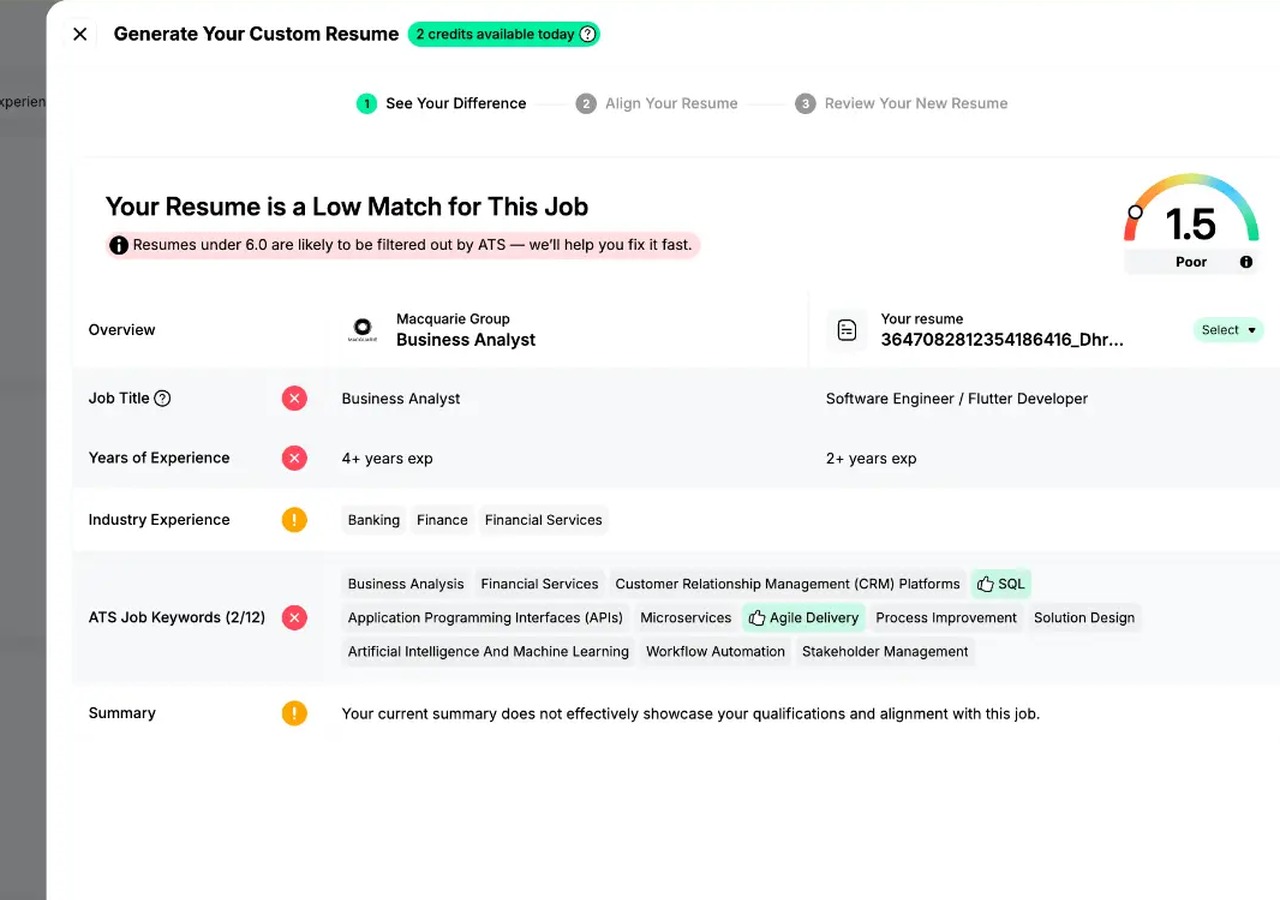
That gives you a more structured starting point.
You can then use ChatGPT—or the Jobright AI Resume Builder—to help rewrite the parts that actually need work.
A Better Workflow: Check First, Then Prompt
Instead of opening ChatGPT and immediately asking it to “improve my resume,” try this workflow:
Step 1: Choose the job
Start with a role you genuinely want to apply for.
Step 2: Compare your resume with the job
Check your current resume against the role before changing anything.
Step 3: Identify the real gaps
Look for missing keywords, skills, experience alignment, and unclear sections.
Step 4: Use targeted ChatGPT prompts
Don’t regenerate the whole resume.
Use prompts to solve specific problems you’ve already identified.
Step 5: Review every change
Make sure every skill, accomplishment, and claim is accurate.
Step 6: Check the final resume again
Compare the updated version with the job before submitting it.
This keeps AI focused on improving your application rather than rewriting your career.
Don’t Let ChatGPT Invent a Better Candidate
There’s one rule worth repeating:
Never add experience just because it appears in the job description.
If the job requires Kubernetes and you’ve never used Kubernetes, adding it to your resume isn’t ATS optimization.
It’s inaccurate.
The same applies to metrics.
If ChatGPT turns:
“Improved campaign performance”
into:
“Increased ROAS by 42%”
without you providing that number, delete it.
AI should help you communicate your real experience more clearly—not manufacture a stronger candidate.
Conclusion
ChatGPT can be genuinely useful for resume optimization when you give it a specific job, enough context, and a focused task.
The weakest approach is:
“Make my resume ATS-friendly.”
A better approach is to break the problem down.
Find the important requirements. Compare them with your experience. Identify what’s missing. Improve the sections that need work. Then review the final resume against the job again.
That’s how ChatGPT becomes more than a resume rewriting tool.
It becomes part of a more deliberate application process.
And if you’re not sure what to ask ChatGPT to fix first, start by checking how your resume matches the job.
Internal links
- Jobright ATS Resume Checker: https://jobright.ai/ats-resume-checker
- Jobright AI Resume Builder: https://jobright.ai/ai-resume-builder
- Jobright AI Job Match: https://jobright.ai/ai-job-match
2 thoughts on “10 ChatGPT Prompts for an ATS-Friendly Resume in 2026”
Comments are closed.